For listing agents
You got a showing request. Here is what it is.
A buyer’s agent is putting together a day of showings and one of your listings is on it. They used About Time Tours to plan it, so the request came from us instead of from their cell phone. The link in that message opens one screen where you can confirm, decline, or say what time actually works.
You do not have an account with us. You do not need one, and the link will not ask you to make one.
- No login
- The link itself is the credential. Nothing to install.
- One listing
- The request covers your property only, not their whole day.
- Reversible
- Confirmed something and need to move it? Reopen the link.
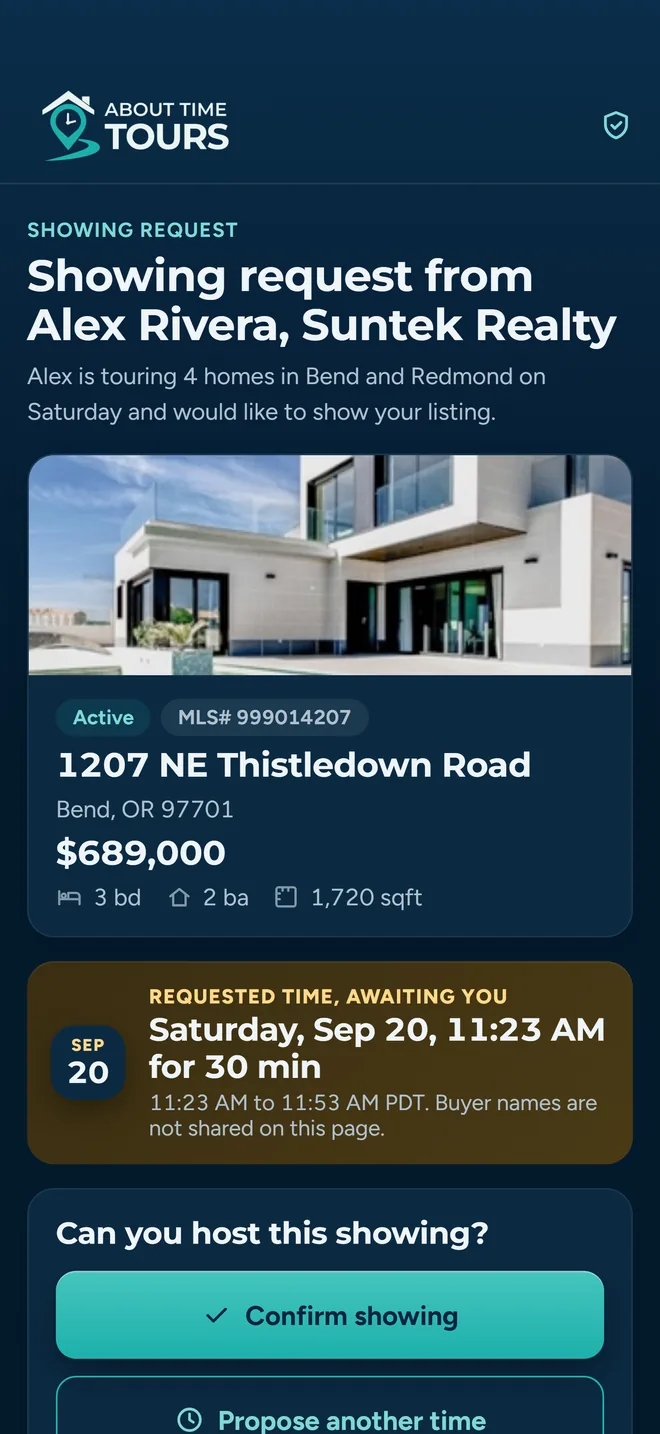
The screen the link opens
Why it reached you
The buyer’s agent added your listing to a tour. When they sent the tour out for confirmation, the app went stop by stop and built a separate request for each property, addressed to the listing agent contact on that MLS record. That is where your email address and phone number came from. Nobody typed you into a marketing list.
What the message contains
- Your property: address, listing photo, price, beds, baths, square feet, MLS number.
- The requested date and the full time window, not a vague afternoon.
- Who is asking: the buyer agent's name, brokerage, phone, email and headshot.
- One link that opens confirm, decline and propose-a-new-time on a single screen.
The buyer is not named.
The request identifies the agent asking, not their client. No buyer name appears in the email, the text message, or the screen the link opens.
Why one request per property
You are not on a group thread with four other listing agents, and you are not being asked to read someone else’s itinerary to find your address in it. Your request covers your showing at your time. Whatever happens with the rest of their day is not your problem to solve.
If your MLS record has a mobile number in a format we can text, you may have received the same request by SMS as well as email. Same link, same screen, one token: answering on either one answers both.
Four things you can do with the link
All four live on the same screen. None of them creates an account, sends you into an app store, or subscribes you to anything.
- 1
Confirm it
One tap on the button. The stop is marked Confirmed on the buyer agent's tour, they get a push notification naming your address and the time, and you get an add-to-calendar button on the same screen: Google Calendar, Outlook, or iCal and Apple Calendar.
- 2
Propose a different time
Open “Decline or propose a new time” and pick a time from the picker. The showing moves into a reschedule state on their side. It does not get thrown away, and you do not get chased for the original slot.
- 3
Leave a note instead of a time
There is a free-text box under the time picker. Something like “I can do 1:15 but not 1:00, there is another showing at 1:30” is enough. The note reaches the buyer's agent word for word.
- 4
Decline outright
Under the submit button there is a “Decline without proposing a time” link. That is the flat no. The stop is marked declined, the buyer's agent is notified, and nothing further is sent to you about that showing.
The one distinction worth knowing
A time, a note, or both is treated as a counter-proposal: the showing stays alive and moves into rescheduling. Only the explicit “Decline without proposing a time” link is read as a flat no. So if you are declining this slot but would take a different one, put anything in either field and the buyer’s agent will come back to you rather than crossing you off.
You can go back and change your answer
The link is not spent after one use. Confirming at nine in the morning does not lock you into a showing when the seller calls at eleven and says the house is not ready.
After you confirm
Reopen the link. It shows the showing as confirmed, with an add-to-calendar button and a “Suggest another time” link. Use that link, give a time or a note, and the showing moves back into rescheduling.
After you propose a time
Same thing. The screen shows what you suggested and your note back to you, and you can revise it. Useful when your first answer was a guess and your day has since firmed up.
After a flat decline
That one is final and the link will tell you so. If circumstances change, the buyer agent’s name, phone and email are in the original message. Call them and they can send a fresh request.
One catch on a revision: once you have already answered, the screen needs a time or a note before it will submit. An empty form is not a change of mind it can act on.
What happens on their end when you answer
No mystery, and no delay. The moment you submit, the buyer’s agent gets a push notification and the stop on their tour changes state.
You confirm
Their alert: “Showing Confirmed”
The stop reads Confirmed on their tour. They stop calling about it.
You propose a time
Their alert: “Alternative time proposed”
The stop reads Needs reschedule. Their screen shows the original time and your suggested time side by side, and one tap moves the showing to your time.
You leave a note only
Their alert: “Scheduling notes from listing agent”
Same reschedule state. Your note is quoted verbatim on the stop, so they are reading your words rather than a summary of them.
You decline
Their alert: “Showing Declined”
The stop reads Declined and drops out of their plan for the day.
If they accept the time you proposed, you get a “Showing Confirmed” email (and a text, if we have a number for you) saying your time was accepted. You do not have to go back and re-confirm it.
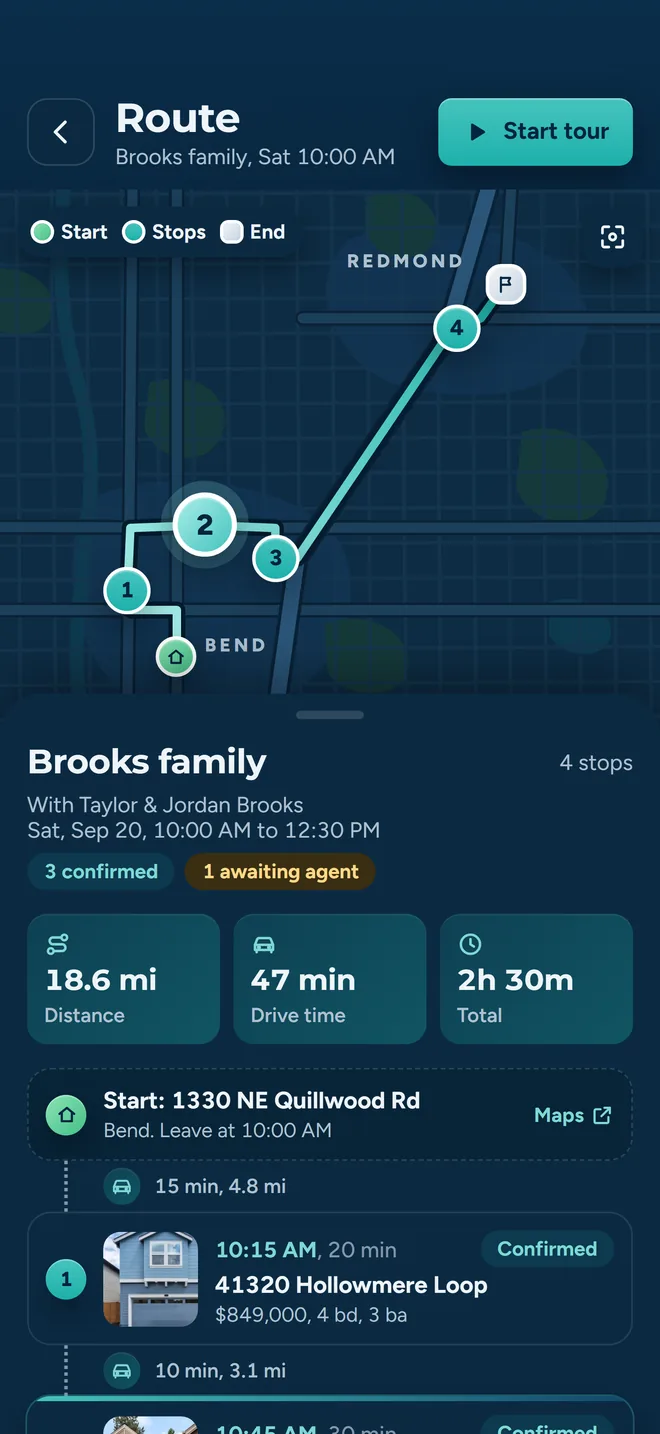
Their side: your showing is one stop in a sequenced day
A fast no is worth more than silence
This is the part worth thirty seconds of your time, and it is not a favor to us.
The showings on that tour are sequenced. Your stop sits between two others with drive time budgeted around it. While your request is unanswered, the buyer’s agent cannot commit the stops on either side of it, so an unanswered request holds up more than your own listing.
A decline lets them close the gap and move on. A proposed time usually gets accepted in one tap, because moving one stop is easier for them than losing the property. Either answer ends the follow-up. Silence just means they call you.
Other messages you might get from us
All of these are about one showing at one of your listings. None of them needs a reply.
- Showing Confirmed
- Your address in the subject line. Sent if you proposed a time and the buyer's agent accepted it: email, plus a text if your MLS record has a mobile number. No action needed; it is telling you the showing is now on for your time.
- Touring Agent on the way
- Your address in the subject line, sent when they set off toward your listing on the day.
- Showing Completed
- Your address again, sent when they mark the showing done.
- Showing request cancelled
- The date in the subject line. Sent if the buyer's agent cancels the tour. You do not have to do anything.
Straight answers about your details
Do I have an account now?
No. Answering the link does not create one. The link works because the token in it is the authorization, not because you are signed in as anyone.
Where did my contact details come from?
The listing agent contact fields on the MLS record for the property being shown. Nothing was scraped and nothing was bought.
Is the email tracked?
There is a one-pixel image in it that marks the request as opened. If your mail client blocks images, as many do by default, it never fires and the request simply stays marked as sent.
Will I be added to a mailing list?
No. Everything we send you is tied to a specific showing at one of your listings. When the tour is done, so are the messages.
Can I just call them instead?
Yes. The buyer agent's name, brokerage, phone and email are in the original message. They can mark the showing confirmed on their side from a phone call.
Something looks wrong with the request.
Contact the buyer’s agent first; they set the time and the property. For anything about the message itself, we are at support@abouttimetours.com.
Our privacy policy covers what we store and for how long.
If you also take buyers out
Most agents work both sides. If you have ever spent a Thursday evening phone-tagging six listing agents to build a Saturday route, that is the job this was built for: you send the requests, the answers come back on their own, and the schedule rebuilds around whatever changes.
About Time Tours works with Oregon Data Share and MIAMI Association of REALTORS listings today: supported Oregon markets and Southeast Florida. $20 per agent per month after a 30-day free trial; $5 per agent per month for organizations of 51 to 1,000 agents; larger by agreement.
Or read how the confirmation loop works from the buyer agent’s side, or the FAQ.