Showing confirmations
Confirm five showings without making five phone calls
Every stop on a tour is a different listing agent, a different voicemail, and a schedule that shifts each time one of them calls back. About Time Tours sends each listing agent a showing request for their stop, takes back a yes, a no, or a different time on a link that needs no account, and rebuilds the tour around whatever comes in.
$20 per agent per month after a 30-day free trial; $5 per agent per month for organizations of 51 to 1,000 agents; larger by agreement.
- One request per stop
- Sent to the listing agent contact on the MLS record.
- No account required
- The confirm link works without a login or a download.
- Three possible answers
- Confirm, decline, or propose a different time.
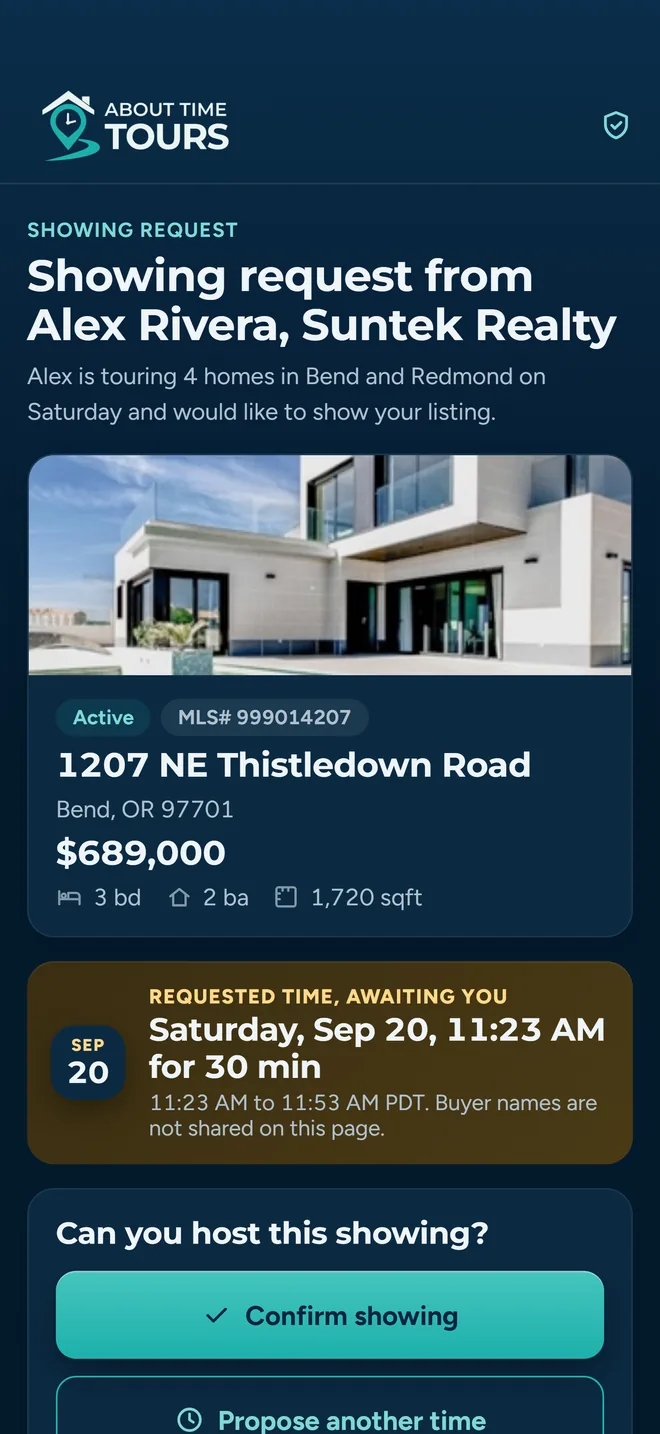
What the listing agent sees after tapping the link
What lands in the listing agent’s inbox
When you send confirmations, the app walks the tour stop by stop and builds a separate showing request for each one. There is no group email and no “here is my whole day, find your property in it” list. Each listing agent gets the one showing that concerns them, at the time you actually set on the stop.
Inside the email
- Subject line built to read in a packed inbox: “Showing Request: 1207 NE Thistledown Road, Sat, Sep 20, 11:23 AM - 11:53 AM PDT”
- A property card with the listing photo, price, beds, baths, square feet and MLS number
- The requested date and the full time window, rendered in your timezone
- Your name, brokerage, phone, email and headshot, so they know exactly who is asking
- One button that opens confirm, decline and propose-a-new-time on a single screen
Your buyer is never named.
The showing request carries your identity as the buyer’s agent: name, brokerage, phone, email. Your client’s name is not in the email or the text message; the listing agent is agreeing to a time with you, not with them.
Text and in-app, when the record supports it
If the listing record carries a mobile number, the same request goes out as a text with the same link, written to fit a single message segment in the common case.
If that listing agent already has an About Time Tours account under the same email, they also get a push notification that opens straight to the stop.
If the record has neither an email nor a phone number, that stop is skipped and reported back to you in the send result, so you know which one still needs a call instead of assuming it went out.
Times are rendered, not guessed
The time in the email is the start time saved on the stop: the same value the stop card shows you and the same value the confirmation screen shows them. Formatting uses your account timezone, falling back to Pacific.
Three answers, one link, no login
The link in the request opens a public confirmation page keyed to that stop. There is no account to create, no app to install, and nothing to remember. The token in the URL is the whole authorisation, which is exactly why a listing agent who has never heard of us can answer in about eight seconds.
The stop flips to confirmed and you get a push notification naming the address and the time. The listing agent gets an add-to-calendar button on the same screen.
A flat no. This only happens if they deliberately choose “Decline without proposing a time”: the stop is marked declined and you are notified so you can drop it or re-pitch.
A preferred time, a free-text note, or both. If either field has content the response is recorded as a counter-proposal; the stop moves into reschedule, not into the bin.
The decline form asks for a time
Choosing decline does not immediately kill the stop. It opens a form with a time picker and a notes box prompting the kind of detail that actually resolves a conflict: the placeholder reads “I can’t do 1:00, but 1:15 works. I have another showing at 1:30.” Anything entered in either field turns the response into a counter-proposal.
A confirmed stop can still change
A listing agent who already confirmed can return to the same link and send a new time; their day moves too. The confirmation is revised into a counter-proposal rather than rejected as “already answered,” and you are notified the same way.
A counter-proposal is not a dead end
This is the distinction most scheduling tools miss. “No, but 1:15 works” and “no” are different answers, and treating them the same is how a tour loses a stop it could have kept. A counter-proposal moves the stop into a reschedule state. It stays on the tour, it stays in the route, and it keeps its place in the schedule maths.
You see both times
The stop shows “Originally scheduled” next to “Listing agent suggested,” with their note quoted underneath. No hunting through an inbox to work out what the current proposal even is.
Accept in one tap
Accepting moves the stop to their time, marks it confirmed, closes out their confirmation record, and notifies them that you agreed: one action, not a three-step save.
Or counter back
Set a different time and the stop resets to pending and re-sends the showing request with the new time. The negotiation stays on one thread instead of splitting across voicemail and text.
Deterministic scheduling first. AI is optional, and off by default.
Once answers start coming back, something has to work out what the day now looks like. That job is arithmetic, not judgement, and it is done by code you can reason about.
How the schedule is built
- Order. A drive-time matrix between every stop (Google Distance Matrix first, OSRM as a fallback, straight-line estimates as a last resort), then nearest-neighbour ordering and a 2-opt pass to cut crossings out of the route.
- Pins. Confirmed stops are pinned at their position. The 2-opt pass will not reverse a segment that contains one, so the optimizer cannot quietly move a time a listing agent already agreed to.
- Times. A forward simulation from the tour start: drive time, plus a buffer for parking and lockbox, plus the visit duration for that stop. The buffer defaults to five minutes and can be overridden per agent or per tour.
- Anchors. A time you typed is exact and never re-padded. A confirmed stop’s stored time is a hard anchor. A counter-proposed time is merged onto the tour date and can only push the clock forward, never pull an earlier showing on top of a locked one.
What blocks an apply, what only warns
Blocking: a schedule that drifts a confirmed stop off its agreed time, or one that runs past a hard end time when the end time is not marked flexible. The apply is refused and the reason is named.
Advisory: an overlap you created yourself by typing an exact time. That warns and still saves. You are allowed to run tight; you just are not allowed to do it by accident.
Optional feature · currently off
The AI layer, stated plainly
AI scheduling recommendations sit behind a feature flag that is switched off in the current build. Nothing on your tour is AI-scheduled today.
When the flag is on, the model is handed the deterministic candidates and constrained to them: it may only recommend a time that already exists in the candidate set, it may not move a confirmed stop unless you have unlocked it, and it may not invent drive times. It returns a summary, recommendations and a suggested order, and applies nothing. Every time that ever reaches a listing agent came out of the deterministic scheduler.
Applying a change tells you who has to hear about it
Moving one early stop cascades into every stop after it. The dangerous version of that is silent: your app shows a tidy schedule while four listing agents still have the old time in their calendars.
Before anything is written, the apply step works out which stops actually moved (more than a minute of change) and which of those the listing agent has already been engaged on, whether the request was sent, they were contacted manually, or they already confirmed.
You get a decision, not a surprise
“Three showings already sent to listing agents have a new time. One was already confirmed and will need to confirm again. Re-send the updated request to those listing agents?” Cancel, apply without re-sending, or apply and re-send.
Apply and re-send fires the per-stop showing request again with the new time and reports how many went out and how many could not be sent.
What a confirmation survives, and what it does not
Confirmed stops that moved drop back to pending, so the board never claims a confirmation you no longer hold.
The same rule covers the tour’s own start time: shift it by more than a minute and every confirmed stop resets, with a count of what needs re-confirming.
Cancellations go out without you writing them
The tour that falls apart on Friday night is the one that costs you a referral relationship. Cancelling in the app sends the notices for you.
- Each listing agent who had committed to a stop gets one email (subject “Showing request cancelled” with the tour date) listing every address they had held for you, not one message per property.
- Clients on the tour get their own cancellation email and an in-app notification.
- Deleting a tour that carries confirmations requires typing DELETE first. It is a destructive action with other people’s calendars attached to it.
Nothing was confirmed? Nothing is sent.
The cancellation step first checks whether the tour actually carries commitments: a confirmed stop, a confirmed client, or client feedback already recorded. A draft you built and abandoned generates no email at all.
That check matters more than it sounds. A tool that emails listing agents about a tour they never agreed to is a tool agents stop using, because the first complaint lands on them, not on us.
Rescheduling follows the same rule
Any change that moves a stop a listing agent has already been engaged on is surfaced before it is written, with a count of who needs to hear about it: the same principle as cancellation, applied to every edit.
The state of every request, on one screen
Each stop carries its own status, so a tour is never a single ambiguous “pending.” You can see which listing agent has gone quiet and which one you should actually chase.
Not sent
No request has gone out for this stop yet.
Pending
The request was sent and nothing has come back.
Opened
The showing request was opened in their email client.
Confirmed
The listing agent agreed to the time on the stop.
Needs reschedule
A counter-proposal or scheduling notes are waiting on you.
Declined
A flat no, with any reason they gave attached.
How “Opened” is measured
A one-pixel tracking image on the showing request records the open against that stop’s confirmation record. The same tracking runs on client itineraries and client invitations, so you can tell a delivery problem from a silence problem.
And what it cannot tell you
Pixel tracking depends on the recipient’s email client loading images, and many block them by default. Treat “Opened” as a positive signal, never as proof: the absence of it does not mean the request went unread.
What we are not claiming yet
You are going to put this in front of listing agents in your own market. You should know its edges before you do.
- MLS coverage is Central/Southern Oregon and South Florida
- Property search runs on the Oregon Data Share feed, covering Central and Southern Oregon around Bend, Medford and Klamath Falls, plus the MIAMI Association of REALTORS feed for South Florida, from a cache refreshed every 15 minutes rather than a live MLS query. Check your market and MLS before getting started.
- AI recommendations are off
- The optional AI scheduling layer is behind a feature flag that is disabled in the current build. The deterministic scheduler runs regardless.
- We can only reach the contact on the record
- Showing requests go to the listing agent email and phone carried on the MLS listing. If the record has neither, we skip that stop and tell you which one.
- What it costs
- $20 per agent per month after a 30-day free trial; $5 per agent per month for organizations of 51 to 1,000 agents; larger by agreement. Nothing on this page is a quote for an organization agreement; those are priced against your roster.
Where this fits with the rest
Tour planning
Where the times in these requests come from: drive-time ordering, buffers, and the pinning that protects a confirmed stop.
Read moreNotifications
Which of these answers reach you by push, email or text, and how to turn each one off.
Read moreMLS search
Where the listing agent contact on each request comes from, and how current that record is.
Read morePut the confirmation loop on your next tour
Guided setup is open to agents working our supported South Florida and Central/Southern Oregon markets. The fastest way to judge any of this is to send five showing requests and watch what comes back.
Already set up? Get the app on the App Store or Google Play.