MLS search and map
Find the house and add it to the tour without leaving the screen.
The usual version of this is three apps. You search in the MLS portal, copy an address into a notes app, then retype it into whatever you use to plan the day. About Time Tours puts search, the map and the tour builder in one place, so a listing you like at 9:40 is a numbered stop on Saturday’s route by 9:41.
Available in supported South Florida and Central/Southern Oregon markets. $20 per agent per month after a 30-day free trial; $5 per agent per month for organizations of 51 to 1,000 agents; larger by agreement.
- 15 min
- Scheduled refresh interval for the listing cache
- 2
- MLS feeds live today: Oregon Data Share, plus MIAMI in South Florida
- 500
- Listings requested for a single map view
- 8
- Sort orders on the results list
Where a search starts
One box. City, ZIP, county, or a street address.
Type what you have and the app works out what it is: a ZIP becomes a ZIP query, a city resolves with its state, a county name queries the county, and anything address-shaped is geocoded first.
- An address that never surfaces in a broad city search gets a second pass: the app scans that city server-side and returns the match even when the listing sits past the page cutoff, has no coordinates, or is in an excluded status.
- Recent searches come back the next time you tap the box, with the resolved location cached so re-running one costs no extra geocode.
- Use my current location drops a center pin from the OS and searches out from where you are standing.
- A plain search returns Active, Coming Soon and Pending listings. Pending is one tap to remove when you only want stock a buyer can still get.
Search is where a tour begins
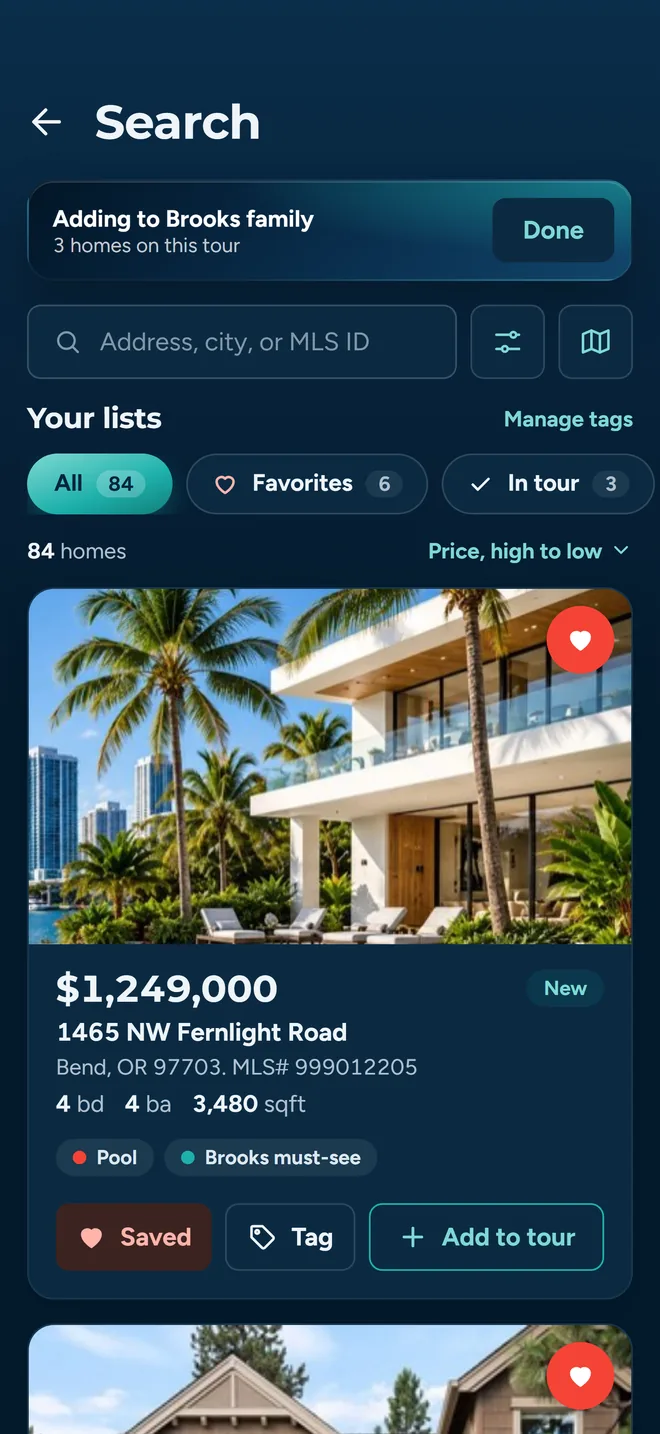
Open search from inside the tour builder and every result card carries an add control. Select several, come back, and they are stops. The same screen also feeds favorites and client lists, so nothing has to be re-entered further down the workflow.
What happens to those stops next (real drive times, ordering, confirmed showings pinned in place) is on the tour planning page.
Filters
Narrow it the way you would describe it out loud
Three beds, two baths, under 650, nothing on a busy road, and it has to have a shop. Most of that is a structured field. The last part is a keyword, which is why there is one.
Price, beds, baths
Min and max price from a slider or typed in, 450K and 1.2M work as shorthand, plus bedroom range and minimum bathrooms.
Size and age
Square footage, lot size and year built, each as a min and max.
Home type
Seven buckets (single family, condominium, townhouse, multi family, manufactured, land, commercial), each fanning out to the MLS subtypes underneath it.
Keyword
Free text against listing descriptions, for what never became a structured field. Shop. Irrigation. ADU.
Include Pending
On by default, a pending listing still matters when you are routing a neighborhood. One tap turns it off.
Favorites and In Tour
Pills above the results narrow to what you favorited, what is already on the tour, or a tag you use.
Whatever is active shows as a count on the filter button, so you never end up staring at eleven results wondering which filter is doing it.
Geography
Draw the area instead of describing it
City limits are a bad proxy for where a buyer will actually live. The part of town they want is a shape, and it usually has a river or a highway on one side of it.
Draw a shape
Draw Search Area opens the map in two modes: Tap Points drops corners one at a time, Freehand traces the outline with a finger. Undo and redraw are both there, and reopening a shape makes every vertex draggable, adjusting is not starting over.
Or use a radius
One, five, ten, twenty-five or fifty miles out from a searched location or from your current position. The ring is drawn on the map and the results are filtered to what falls inside it.
Or pick a boundary
ZIP code, county, city and school district, loaded per state from Census TIGER/Line shapes and drawn as overlays. Pick one and the search is confined to it, school district especially, which the MLS does not give you cleanly.
Map and list
Two views of the same search, and the map has an opinion
One button flips between the list and the map. They are not separate searches with separate filters. The filters, the drawn shape and the boundary all carry across.
Built for pins, not cards
Map mode runs a lighter query that asks for the basics (location, price, status) and requests up to 500 of them, so an area comes back covered in pins rather than the first page of a list.
Tap a pin, keep browsing
A property card slides up over the map. Arrows step to the next and previous property without dismissing it, so comparing four houses on the same street is four taps, not four round trips.
Pan, then flip back
Move the map, switch to the list, and the list is re-queried against the box you were just looking at. The view you scrolled to becomes the search.
The list has eight sort orders: distance from the search, price both ways, largest square footage, largest lot, most bedrooms, most bathrooms and newest listing. Your choice sticks between app launches.
Listing detail
Enough of the listing to decide whether to drive there
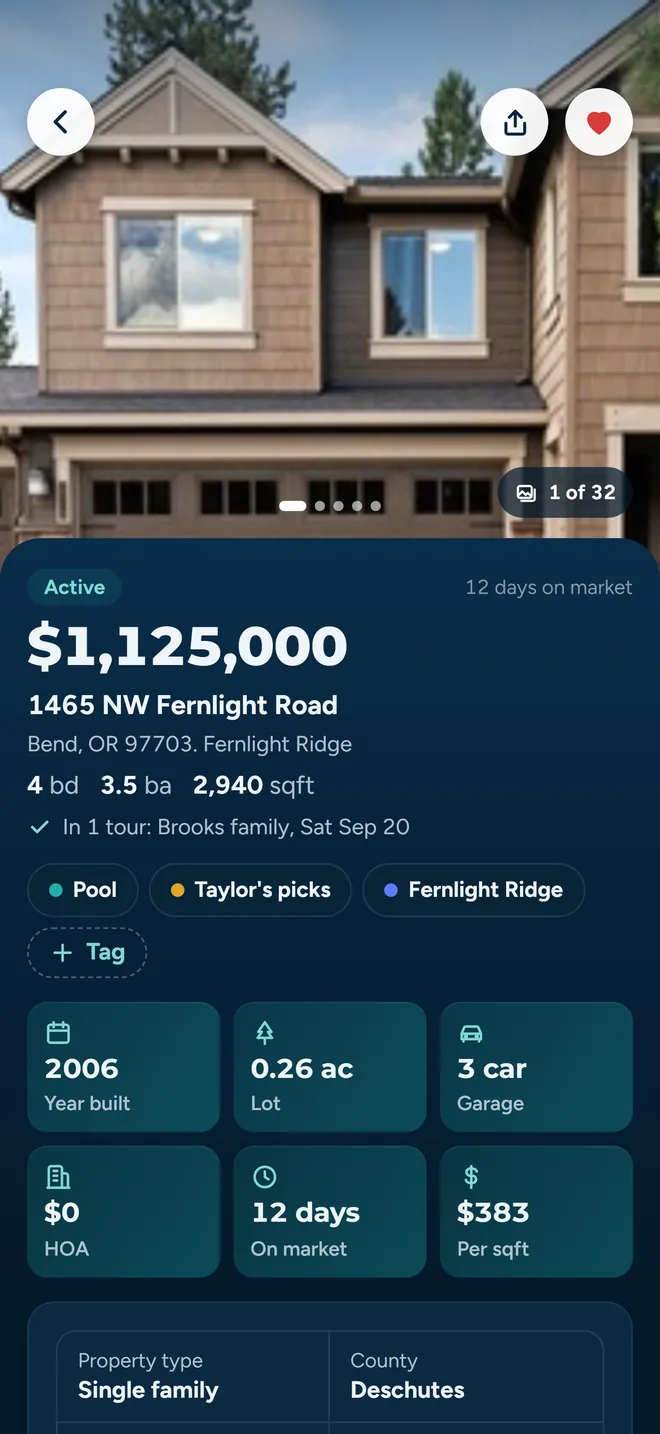
Open a result and you get the full photo set in a gallery, the description, and an attributes grid with property type, county, year built and lot size. Favorite it or add it to a tour from the same screen.
- Photos are watermarked with the originating MLS's own logo, resolved per listing rather than stamped with one generic mark.
- Every listing carries its attribution line (listed by which agent, at which office, from which MLS) because that is what the IDX rules require and because you are about to call that person.
- Sharing a listing produces a link on app.abouttimetours.com that opens the app when it is installed. Someone without an account still sees a real page with photos, price and attribution; someone signed in lands on the full detail screen with favorite and add-to-tour intact.
Things worth not retyping
Saved searches, and your own listings in one tap
A saved search keeps the shape
Name it and it stores the filters, the polygon or radius you drew, and the boundary you picked, not just the price range. Apply it later and search reopens exactly as you left it, drawn area and all. That is the difference between a saved search you use and one you re-create every time.
My Listings
Listings where your email is the listing agent of record in the MLS, pulled automatically and split into current stock and past listings. No tagging, no manual import: if the MLS has you on it, it is there.
What listing agents get out of the rest of the product is on the listing agent page.
Where the data comes from
This is a cache, and you should know that
Plenty of products call this a live MLS feed. Ours is not one, and describing it accurately costs us nothing while getting it wrong could cost you a conversation with a client.
Step 1
Replication feeds pull the listings
Server-side replication feeds (Spark for the Oregon Data Share feed, the MIAMI Association of REALTORS feed for South Florida) serve every listing query. Access tokens live server-side; the app never holds MLS credentials.
Step 2
A job writes them to a database
A scheduled function runs every 15 minutes, pulls Active, Coming Soon and Pending listings for the supported markets, and writes them into a listing table indexed for the queries the app actually makes: by city, by ZIP, by county, by listing agent, and by geohash for map and radius work.
Step 3
The app reads the database
Search, listing detail, batch lookups and status checks all read that table today. The switch that decides this lives on the server, so the app can be moved back onto direct API calls without shipping a new build.
The practical consequence: what you see can be up to fifteen minutes behind the MLS. For picking eight houses to show on Saturday that is fine. For confirming that something is still on the market ten minutes before you write, check your MLS. Which markets are covered, and which are not, is on the coverage page.
Straight answers
What search does not do yet
You would find all of this out in week one anyway.
Two regions, not a national feed
Search resolves the Oregon Data Share feed, covering Central and Southern Oregon around Bend, Medford and Klamath Falls, plus the MIAMI Association of REALTORS feed covering South Florida. There is no national feed, so a search outside those markets returns nothing today. Check your market and MLS before getting started.
A cache, not a live query
The app reads a database of listings refreshed on a 15-minute schedule. A price cut or a status change made four minutes ago may still show its previous value until the next refresh lands. Confirm anything time-critical in your MLS.
Most sorts happen on your device
Only price high-to-low comes back pre-sorted from the server. Choosing largest lot, most bedrooms or newest listing pulls a wider pool (up to 200 rows, stripped of photo arrays) and re-orders it in the app. On a very broad search you are ranking within what was fetched, not the whole market. Narrow the area and the answer gets exact.
What it costs
$20 per agent per month after a 30-day free trial; $5 per agent per month for organizations of 51 to 1,000 agents; larger by agreement. Organization agreements are quoted against your roster, not listed here.
Try it against a real search
Run the search you ran this morning
Draw the area your buyer actually wants, set the filters you would have set anyway, and see whether the result is the shortlist you built by hand. Coverage is Central/Southern Oregon and South Florida today. If you are outside those markets, join the waitlist and we will tell you when your MLS lands.