Clients and favorites
Your buyers, their households, and the shortlist they actually built
A married couple is two phone numbers, one purchase and one group text, and by the third weekend nobody can say which house had the shop. About Time Tours keeps the roster, the household and the saved properties in the app you build tours in.
$20 per agent per month after a 30-day free trial; $5 per agent per month for organizations of 51 to 1,000 agents; larger by agreement.
- Invited by email
- Their address is the only required field.
- Good for seven days
- The link expires a week after you send it; resending issues a fresh one.
- Households, not contacts
- Two buyers on one purchase are linked, named and messaged as a unit.
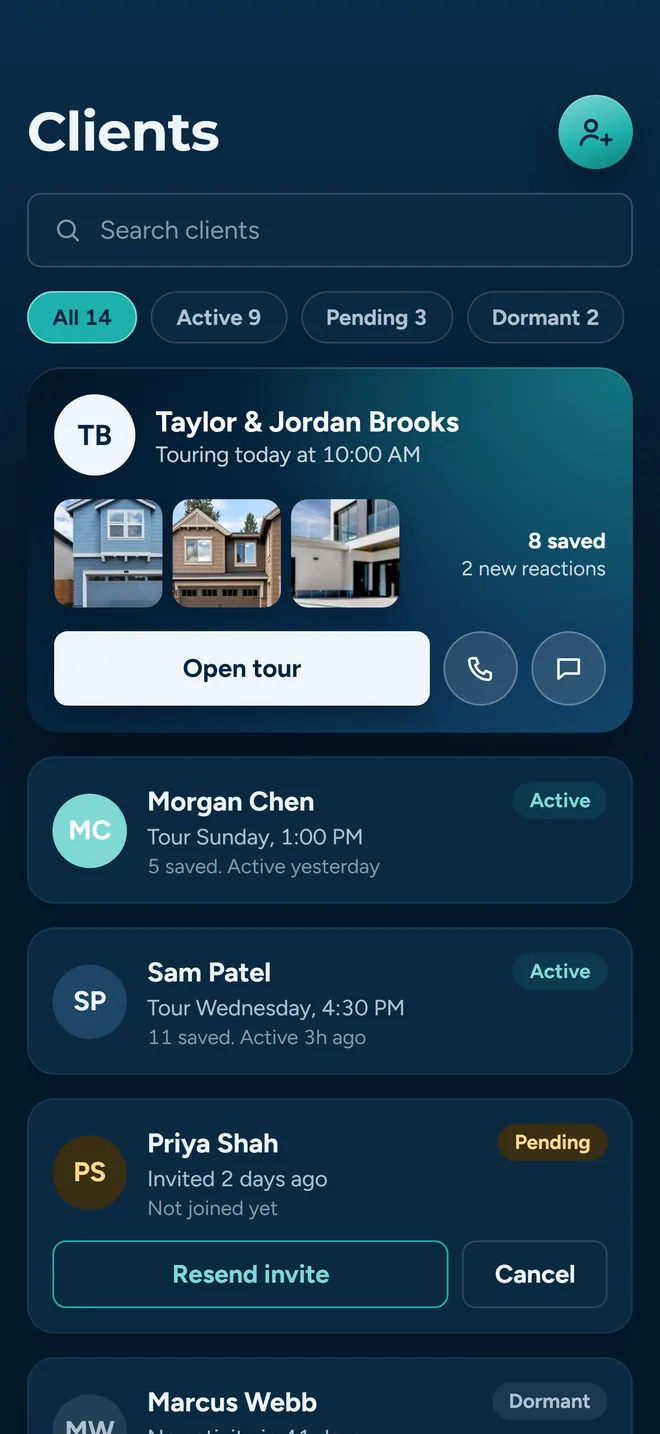
An invited client, waiting in your list
Getting a buyer into the app
You send an invitation from the Clients tab. It goes out as an email from About Time Tours with your name on it and a link that carries their invite code, so when they sign up they are already attached to you rather than floating loose in the app.
The form asks for two things
Email address, required. Phone number, optional. The buyer supplies their own name and the rest of their profile when they accept, so you are not typing a contact record on their behalf.
Duplicates are caught before the send
The screen loads your pending invitations and your existing clients first, then matches on email. A hit opens a Duplicate Found dialog naming the address and whether it belongs to a pending invitation or a registered client, with buttons to edit the address or jump to your client list. The backend repeats the check, so a race between two devices does not produce two invitations.
If they already work with another agent
The invitation still sends, and you get told: this client already works with another agent, and they will need to confirm switching to you. No silent reassignment.
Resending replaces, it does not stack
The resend control on a pending or dormant row cancels the old invitation before sending a new one, so the buyer never ends up with two live links and you never end up with two rows for one person.
The link is good for seven days
The invitation is stamped with an expiry seven days out. After that the accept screen refuses it with an expired message rather than half-attaching the buyer to your account, and the row drops off your active list. Send a new one from the client row and they get a fresh week.
A phone number is for you, not for automation
If you add a phone number, it is stored so you can call or text the buyer by hand from their card. It does not trigger an automated text. The app says so on the form: the client has to confirm SMS consent in the app before automated messages can be sent to them.
One gate worth knowing about up front: agents whose licence has not been confirmed yet can sign in and look around, but inviting clients is blocked until verification clears. You get a plain explanation rather than a failed send.
One list, with the state of every invitation on it
The Clients tab searches by name, email or phone, and filters to Active, All, Pending, Dormant, Declined or Inactive with a count on each chip. Registered clients and outstanding invitations sit in the same list, sorted so the people you can actually work with come first.
What a row can say
- Invited
- The invitation exists and has not been accepted.
- Opened
- The invitation email loaded its tracking pixel at least once.
- Active
- They registered and are linked to you.
- Declined
- They turned the invitation down.
- Dormant
- A pending invitation that has been sitting a long time.
- Deleted
- The account was deleted or paused. Contact actions are switched off. The filter chip that collects these rows is called Inactive.
And what a row can do
- Call, text or email straight from the card, using the device’s own apps.
- Resend an invitation that has gone quiet, or delete it and stop chasing.
- Open the client sheet for their contact details, the tags they have set up on their own favorites, and a button that renders the app as them.
Counters under each active client
How many lists they have shared with you, how many tours they have been on, and how much tour feedback they have left, with their thumbs up and thumbs down beside that count. Tapping the feedback counter opens the tour feedback report. Recent activity is not on the row: open the client to see it.
How Opened is measured
The invitation email carries a one-pixel image. When a mail client loads it, the row flips to Opened. That is a real signal that the message reached a human.
And what it cannot tell you
It cannot prove the opposite. Plenty of mail clients block remote images by default, so a row that still says Invited may be sitting in front of someone who read every word. Treat Opened as evidence, never absence of it as proof.
Households, not just contacts
Two people buying one house are one decision with two calendars. Select them in the client list, tap Link, and they become a named group with a single card. Rename it to whatever you call them (the Ortegas, the Bend investors) and the name sticks everywhere the group appears.
Message the whole household
The group menu opens a text or an email addressed to every member at once, in your own messaging app. Members without a phone number on file are simply left out rather than silently dropping the send.
One group at a time
Selecting someone who is already in a household is how you add people to it: the others you picked join that group. What the app refuses is two different households in one selection, since merging them would mean choosing whose name and history survives. And when regrouping changes who a signed agreement covers, it tells you those agreements will be voided and waits for you to confirm.
Leaving a group is not leaving your roster
Removal is split into two deliberately separate actions behind a submenu: unlink from this group, which keeps them in your client list, and remove from my client list, which disconnects them from you but leaves their account intact.
The agent-client dashboard
A separate screen from the roster, built for the question you actually ask on a Monday: what has happened with my buyers since Friday. It opens on four counters (clients, lists shared with you, properties inside those lists, and favorites activity in the last seven days), then splits into four tabs.
Clients
Your roster grouped by household, each card carrying that buyer's tags, their thumbs-up and thumbs-down counts, how many lists they have shared with you and how many tours they have been on.
Showings
Requests that landed on you as the listing agent, sorted pending first, confirmable or declinable without leaving the screen.
Activity
A merged feed of what your clients have been doing to their favorites (properties added, properties removed, lists created, lists shared), newest first, each row tapping through to the listing.
Requests
Properties your clients want to see, waiting on your approval. The tab label carries the count so you can see there is something to do without opening it.
Feedback that adds up
During a tour, each stop takes a thumbs up or down and a comment from every client separately, so a couple who disagree are recorded as a couple who disagree.
Their Tour Feedback report gathers it into a sortable table of every property they have seen, which tour, what time, how long, and the rating, ranked by interest, so the follow-up call writes itself.
Property requests come to you
A client who finds a house does not text you a link. They add it to one of their tours as a requested stop, or send it as a standalone request tagged “no tour assigned”.
Both land in the Requests tab with photo, address, price and who asked. Approve turns a requested stop into a real one and notifies them; Decline takes it off. Either way it is recorded.
View as client, before you ask them what they see
Support calls that start with “I don’t see the tour” are hard to answer from the agent side of the app. So there is a switch in Settings: pick a client from your list and the app re-renders as them.
Their data, not yours
Favorites, tags, tours and the assigned-agent view all resolve to the client you picked, not to your own account.
Starts where it matters
Launching it from a client card drops you straight onto their favorites, which is where most of these questions actually live.
Survives a restart
The mode is stored on the device, so a reload does not silently put you back in agent mode. Flip the switch off and the app tells you full agent privileges are back.
Favorites, and the tags that make them usable
Twelve saved houses with no structure is a longer list, not a shorter decision. Favorites are one collection per person with tags layered on top, so the same house sits in Top Picks and Needs Work at once.
Where the heart lives
Every search card carries a heart and the detail screen has a Favorite button. Tapping the heart again on the detail screen opens the tag sheet rather than removing it, so a double-tap cannot lose a saved property.
Tags instead of folders
A property is saved once and carries as many tags as you want (Downtown, Pool, Top Picks), each named and coloured. The Favorites screen turns every tag into a filter pill with a live count.
Tag sheet, not a form
The manage-tags sheet lists every tag with a checkbox and lets you type a new one inline, which applies it in the same action.
Removing a tag is not deleting
Removing a property from a tag only removes the tag. Deleting it from the unfiltered list is what actually unsaves it.
Saved properties are checked in the background and ones that no longer resolve to a listing are cleaned out, so the list does not fill with houses that are off the market.
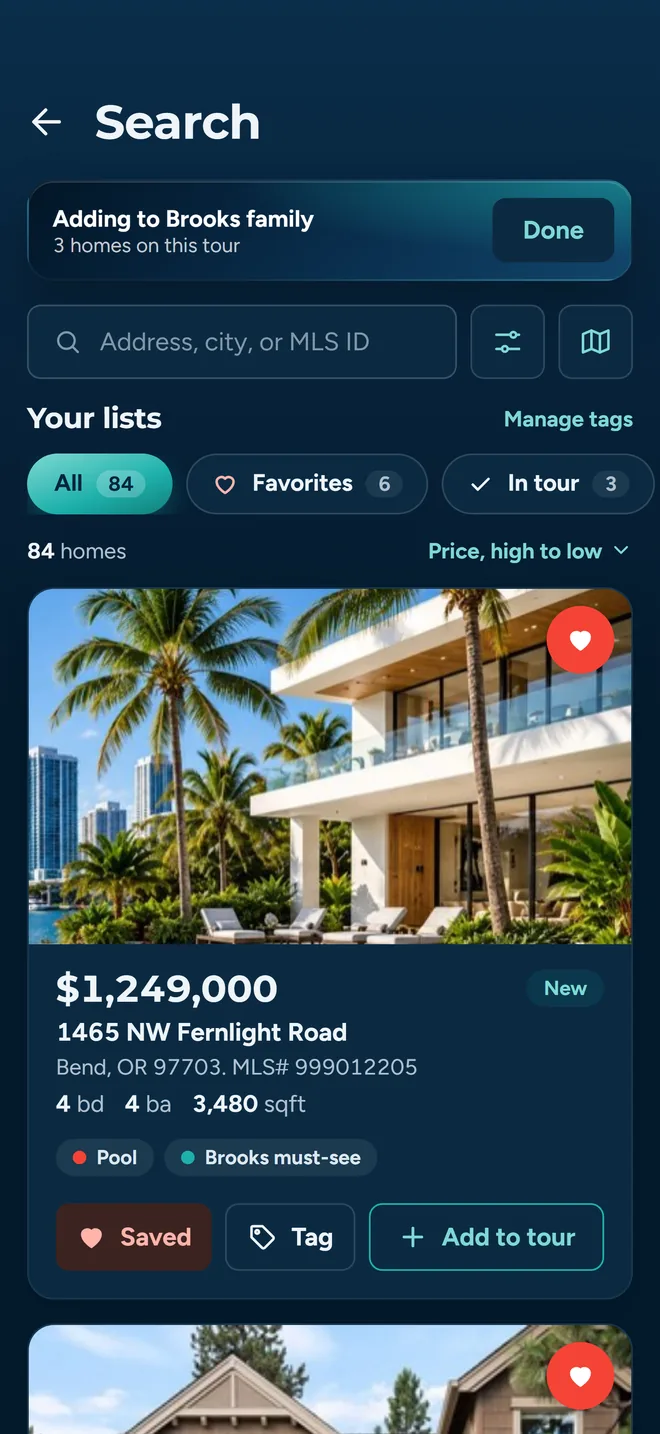
The heart on a search result is where a favorite starts
Sharing a list, and taking it back
Sharing is per tag, or all favorites at once. Pick a recipient and they get the list inside their own app: the shared list appears under their Shared tab with your name on it, updating as you change it, rather than as a set of screenshots frozen at the moment you sent them.
Clients or other agents
A segmented control switches the recipient search between your clients and other agents. Either way you find the person by typing their name, email or phone, from two characters up; agents are not browsable by office.
See who has access
Every tag shows a badge with the number of people it is currently shared with. Tap it for the list of names, and revoke any one of them from there.
Sharing works both ways
Clients can push their favorites to you, or to the other buyers in their household, from their own Favorites screen. That is what fills the Lists counter on their card and the Activity feed on your dashboard.
When the recipient is not in the app
A list can also go out through the phone’s own share sheet. That builds a plain message with one bullet per property: address, price and a link that opens the listing in the app if it is installed and a public web page if it is not.
Saved searches sit alongside
The same screen holds saved searches. A set of filters you use every week is stored by name with a plain-language summary of what it matches, and reapplies in one tap. That is the search side of the same problem: not repeating yourself.
Straight answers about the edges
Things it is better to know before you invite ten people than after.
- Invitations go by email
- The invitation itself is an email. A phone number on the record is there for you to use manually, and automated messaging waits on the client’s own SMS consent.
- There is no note field on a saved property
- Tags and colours are the organizing tools today. Written impressions belong to tour feedback, where each stop takes a comment per client.
- Duplicate detection matches on email
- Two records for the same person under two addresses will not be caught. Phone matching is built but switched off.
- MLS results follow coverage
- Search is sourced from Oregon Data Share and the MIAMI Association of REALTORS feed, so favorites are built from listings in supported Oregon and Southeast Florida markets. Clients, households and sharing work regardless of where you are. Coverage detail.
Related reading: tour planning, showing confirmations and why this is not just a group text.
Put one household in and see how it reads
Invite a couple, link them into a group, and run one tour. The feedback table after it is the fastest honest test of whether any of this is better than the thread you are using now.
Already set up? Get the app on the App Store or Google Play.