Skip to content

The honest comparison

Why not a group text and a spreadsheet

What most buyer agents actually use to run a five-stop Saturday is not a competing product. It is a group text, a sheet of addresses and a phone, and that stack is free, universal and has outlasted a lot of software.

So this page starts with what it does well, then names the four places it breaks and what we built for each. Keeping the spreadsheet is a defensible call; the last section says when.

$20 per agent per month after a 30-day free trial; $5 per agent per month for organizations of 51 to 1,000 agents; larger by agreement.

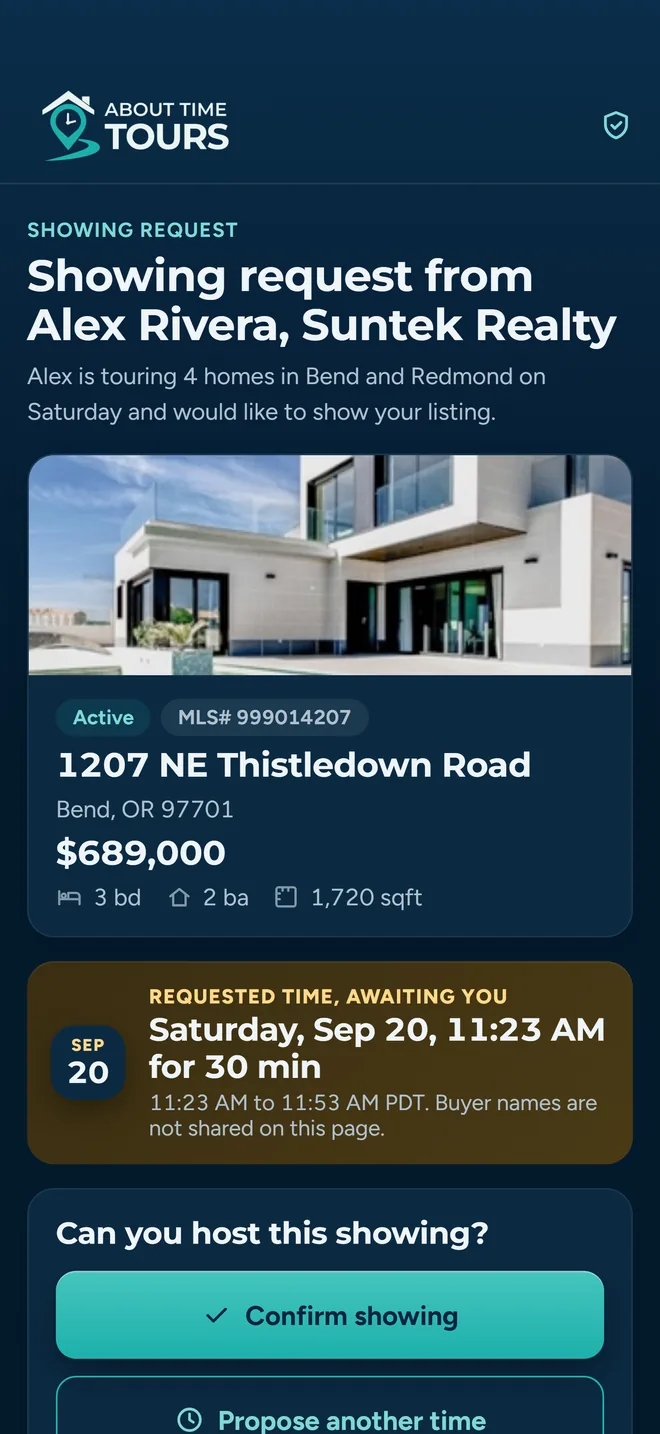
The showing request a listing agent receives on their phone: the requesting agent's name and brokerage, a property card for 1207 NE Thistledown Road in Bend, Oregon with price, beds, baths and square feet, the requested date and thirty-minute window, and a Confirm showing button.

Start with what works

Four things the manual method does better than most software

None of these are small, and all four are the reason previous attempts at this category went nowhere. A tool that trades all of them away for a dashboard has earned the eye-roll it gets.

  • Zero setup

    You open Notes or a sheet and start typing addresses. No account, no import, no onboarding call, no waiting on anyone in IT.

  • Nothing for the listing agent to join

    The person on the other end of a showing request is not your customer and never will be. They answer a phone call or an email because those already work on their phone today.

  • It works everywhere

    Every agent, every brokerage, every board, every state. A phone number has no coverage map and never asks whether your market is supported yet.

  • Nothing for your buyer to install

    Your client reads the text on the drive over. They do not create a password, download anything, or learn a new screen the night before a tour.

Where it breaks

Four things it cannot do, and what we built for each

Every one of these shows up the same way: not as a disaster, but as twenty minutes you did not plan for, on a morning when you did not have twenty minutes.

Break one

Nobody can say who confirmed what

Five stops turns into a dozen threads. One agent confirmed by phone on Tuesday. One texted “should be fine.” One never replied and you cannot remember which one. Saturday morning you are scrolling back through messages with your client already in the passenger seat, and the answer is not in any single place.

What the app does

Every stop carries its own confirmation record

The confirmation is a row attached to the stop, not a message in a thread. It stores when the request went out, when an open registered, when the listing agent answered, what time they proposed if they proposed one, and any free-text note they left. The stop shows one badge for its current state (Not Sent, Pending, Opened, Contacted, Confirmed, Needs reschedule, or Declined) and the tour list shows every stop's badge at once. There is nothing to reconstruct, because none of it lived in a thread.
Break two

One agent moves a time and the afternoon has to be rebuilt

The 11:00 can only do 1:30. Now stops three, four and five are wrong. Two of them were already confirmed at their old times, so fixing the order means going back to agents who already said yes, which is the part everyone quietly avoids until the morning of.

What the app does

The schedule is recomputed, and confirmed stops hold their place

When a counter-proposal lands, the app simulates the day forward from the tour's start using each stop's visit duration and the buffer between showings (five minutes by default, overridable per tour or per agent) and works out which orderings actually fit the proposed time. Stops the listing agent already confirmed are locked and passed to the router as pinned, so a rebuild routes around them. If the only workable option does move a confirmed stop, the app says so before you apply it and tells you those agents will need to re-confirm. Unlocking a confirmed stop by hand carries the same warning. Applying writes the new times to every stop in one action.

Break three

Your client cannot tell the houses apart afterwards

“Which one had the yard?” Three days later, from a thread of five addresses and two blurry photos, nobody can answer that, and it is the question that decides whether there is an offer. Worse, two buyers on the same tour remember it differently and there is no record of who liked what.

What the app does

The itinerary is a page, and feedback is captured per person

Your client gets the tour as a link that opens without an account: stops numbered on a map in the order you will drive them, a card per property with its photos and details, your contact card, and a button that tells you they have seen it. During or after the tour, feedback is recorded per stop and per client (Interested or Not Interested), so a couple that split on a house shows up as split rather than averaged. It rolls up on that client's dashboard next to their tour history. Properties also land in favorite lists with tags and colors, which you and the client can share back and forth.

Break four

There is nothing to hand over when you are not the one driving

You get the flu on Friday. The tour lives on your phone: your thread, your sheet, your memory of which agent said what and which one wanted a call rather than an email. Handing it to a teammate means an hour on the phone, and the details still get lost.

What the app does

The tour is a record on the account, not a thread on a device

Stops, order, arrival times, the confirmation state of each one, the listing agent's contact details per stop, and the client list all live on the tour itself. Any tour can be shared as a link that opens without an account, so whoever is covering can read the itinerary from a parking lot. If you work on a team, you can invite agents by search or by email and go on duty when you head out. Starting a tour asks which of your teams can see your location for it, and on-duty members who are sharing show on the team map to each other, so whoever picks the day up can see where everyone already is.

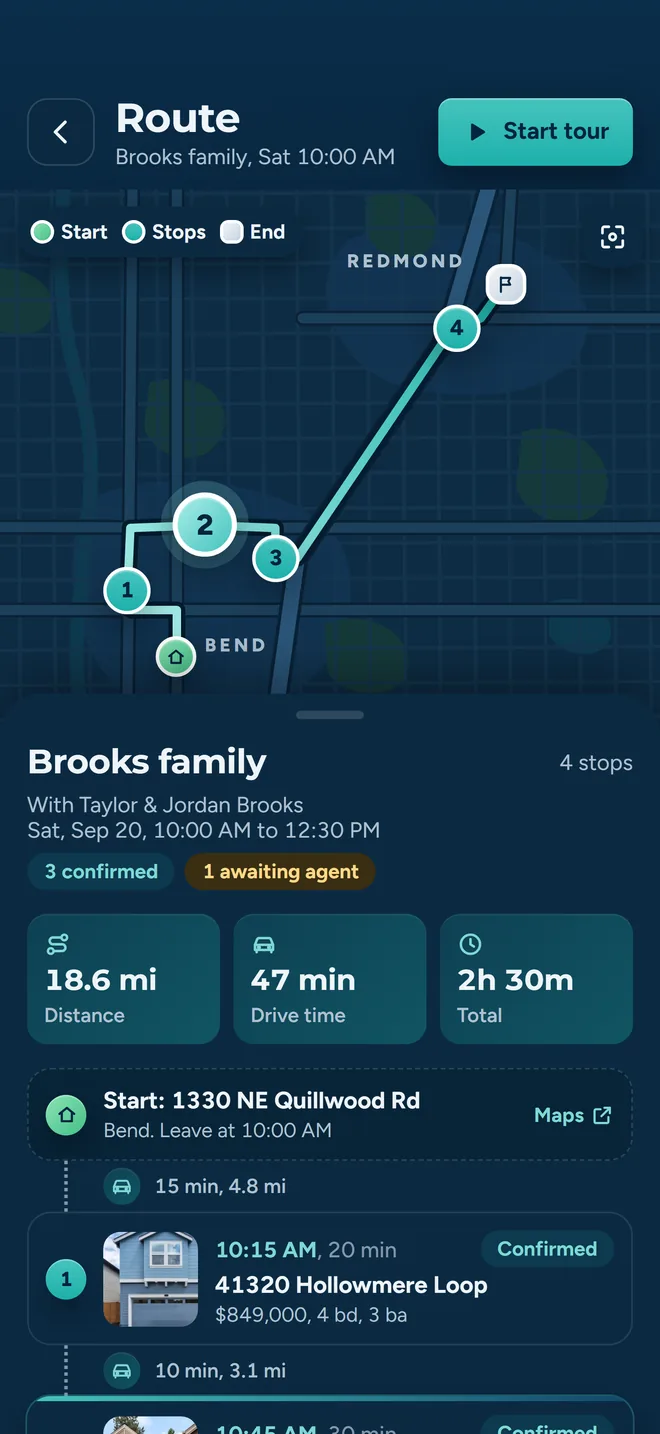
The Route screen for a four-stop tour: a map with every stop numbered in driving order across Bend and Redmond, the day totaled as distance, drive time and length, then each stop listed with its address, price, beds and baths, its arrival time, and whether the listing agent has confirmed it.

The order is the part a sheet cannot hold

A spreadsheet stores addresses in the order you found them. The drive is a different order, and it changes every time a listing agent answers. The app builds a drive-time matrix between the stops (Google Distance Matrix first, with OSRM and straight-line distance as fallbacks when it is unavailable), seeds a route with a nearest-neighbour pass, then improves it with 2-opt. Stops a listing agent has already confirmed are pinned, so improving the route does not quietly cost you a confirmation you already earned.

Arrival times come out of the same pass: each stop's visit duration plus the buffer between showings, carried forward from the start time you set.

How tour planning and routing work

What we kept

The parts worth keeping, kept

A tool that only works when everyone adopts it does not work. The two people you most need to reach are the two least likely to install anything, so neither has to.

  • The listing agent still joins nothing

    The confirm link opens in a browser: no account, no download, no password. Confirm, decline or propose another time on one screen, with the property and the requested window on it.

  • The phone still works, and the app expects it

    On any stop you can tap to call, text or email the listing agent, with the message written and the confirm link inside. The stop is marked Contacted and the outreach logged, so a phone call is recorded the same way an email is.

  • Your buyer still installs nothing

    The itinerary link works in a browser. Clients can have the app, but reading the plan does not require one.

The other side

Where the spreadsheet still wins

You will find all of this out in week one, so it may as well be on the comparison page rather than in a support ticket.

  • Two markets today

    Listing data covers Central and Southern Oregon, through the Oregon Data Share MLSs, and Southeast Florida, through the MIAMI Association of REALTORS® feed. If you work outside those markets, the search will not have your listings and a spreadsheet is still the honest answer today. Join the waitlist and we will tell you when that changes.

  • It is a cache, not a live feed

    Listing data refreshes on a schedule: on the Oregon feed, every fifteen minutes. For a status that changed four minutes ago, your MLS is ahead of us. Check the MLS before you commit to anything that turns on a status.

  • Confirmed is a state, not a guarantee

    A listing agent who already confirmed can come back through the same link and revise into a counter-proposal: their seller changed plans, and they should be able to say so. That is deliberate. It also means Confirmed describes where things stand right now, not a lock.

  • Opened is a signal, not proof

    Open tracking is a pixel. When it fires you learn an open registered. When it does not fire you have learned nothing: blocked images, a preview pane and a stripped-down mail client all look identical to being ignored. Treat a missing Opened badge as no information.

  • Short tours may not be worth it

    If your typical day is two houses with two agents you have known for a decade, the spreadsheet is genuinely fine. The overhead starts paying for itself around the point where the confirmations outnumber the stops.

  • What it costs

    $20 per agent per month after a 30-day free trial; $5 per agent per month for organizations of 51 to 1,000 agents; larger by agreement. Judge it on one real tour, not on the price.

The plainest version: this replaces the coordination, not the judgment. You still pick the houses, you still read the room in the driveway, and you still call the agent who only ever answers a call. What you stop doing is holding six half-answers in your head on the drive to the first stop.

Test it against a tour you drove

Rebuild last Saturday in the app and compare it to what the thread actually cost you. About ten minutes, and fairer than any feature list.

We use cookies to measure how this site is used and to see which ads bring agents here. Decline and we will remove them. Privacy policy.