Tour planning
Build the tour. The drive order solves itself.
Nine showings, one afternoon, one listing agent who already agreed to 2:15. Ordering that by hand is a routing problem you are solving in a parking lot between stops. About Time Tours solves it with real driving times, keeps the times you already promised exactly where they are, and gives you back the order to override whenever you disagree.
MLS coverage in South Florida and Central/Southern Oregon today. $20 per agent per month after a 30-day free trial; $5 per agent per month for organizations of 51 to 1,000 agents; larger by agreement.
- 10 x 10
- Origins by destinations per Distance Matrix batch
- 3
- Drive-time sources, tried in order until one answers
- 5 min
- Default buffer between showings, tunable 0 to 60
- 2-opt
- Improvement pass run after the first ordering
Draft first
Start a tour without committing to one
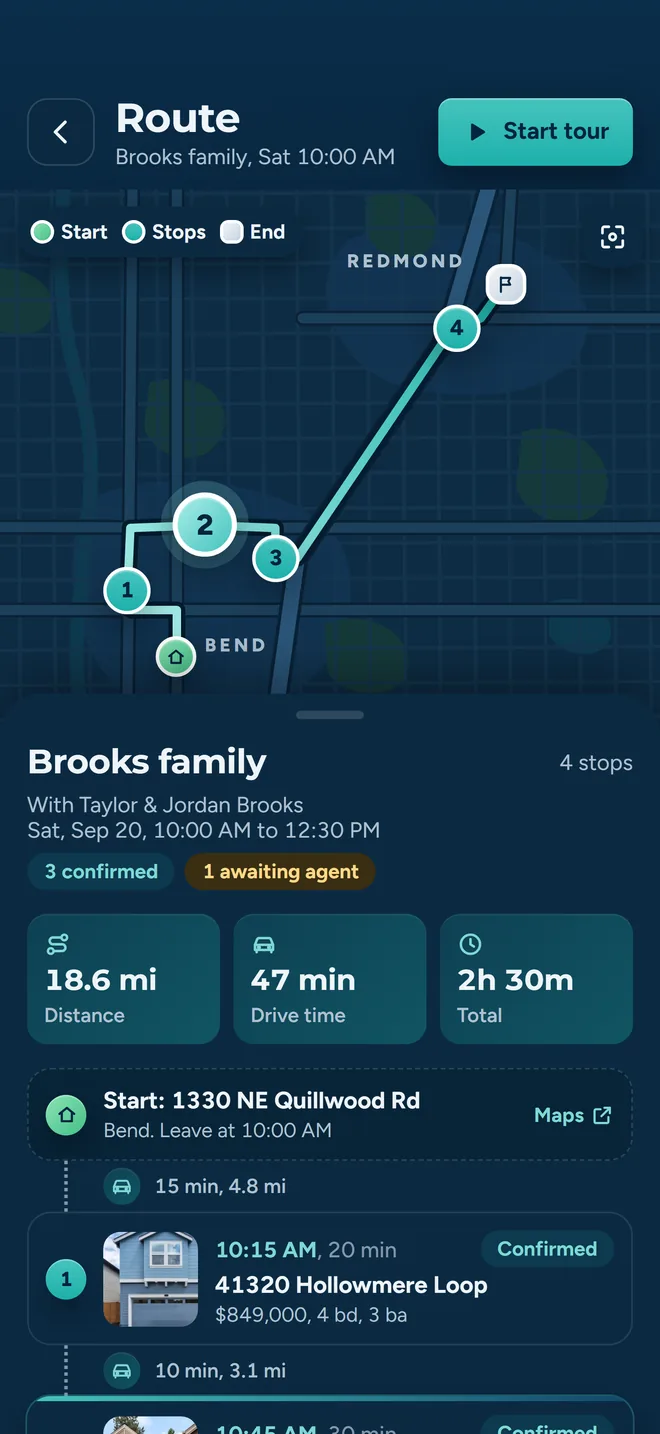
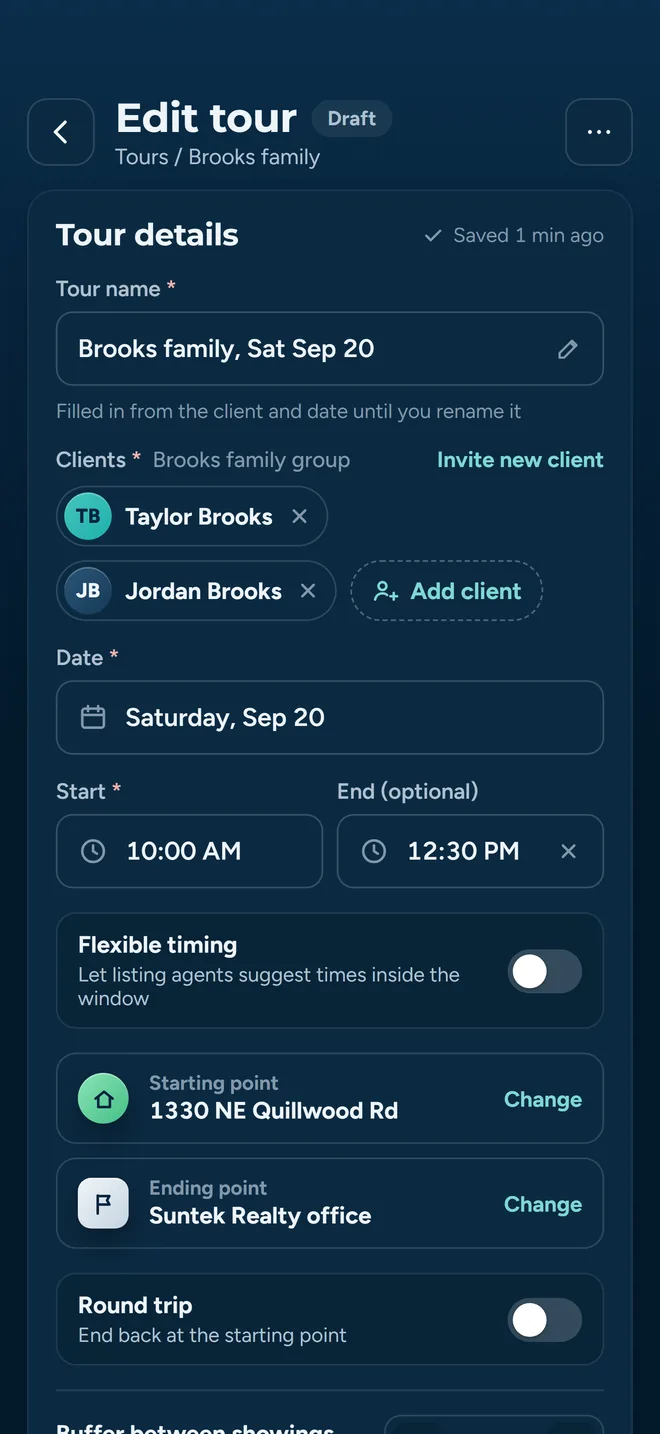
Opening the tour builder creates the tour immediately, as a draft. Every stop, time and client you add is saved against a real record from the first tap, so a dead battery in a driveway costs you nothing.
The obvious cost of that design is clutter, so it is handled. If you leave the builder with nothing in it, the empty draft deletes itself. Not just on the close button: on swipe-back, on the Android back button, on a tab change, on a deep link that navigates away. Anything left over is hidden from the tour list rather than sitting there as another “New Tour, 0 stops” row.
- Work in progress survives being interrupted, because it was never held in memory.
- Real drafts group into their own section on the tour list so you can finish them later.
- Empty husks never reach the tour picker you use when inviting a client.
Stops
Every stop is a routing node, listing or not
Add Properties opens MLS search inside the builder, so you never leave the tour to go find the next house. Add Custom Location covers everything the MLS does not: your office, the lunch stop, a new-construction site with no listing yet, the buyer’s hotel.
Custom stops are first-class, not annotations
A custom location is geocoded and enters the drive-time matrix exactly like an MLS stop. It can be the start, the end, or anything in between, and it carries its own leg time and distance.
And they know what they are not
A custom stop is excluded from listing-agent confirmation requests and from MLS status checks, because there is no listing agent to email and no listing status to go stale. Any stop that arrives without coordinates is geocoded before routing rather than silently dropped.
Endpoints
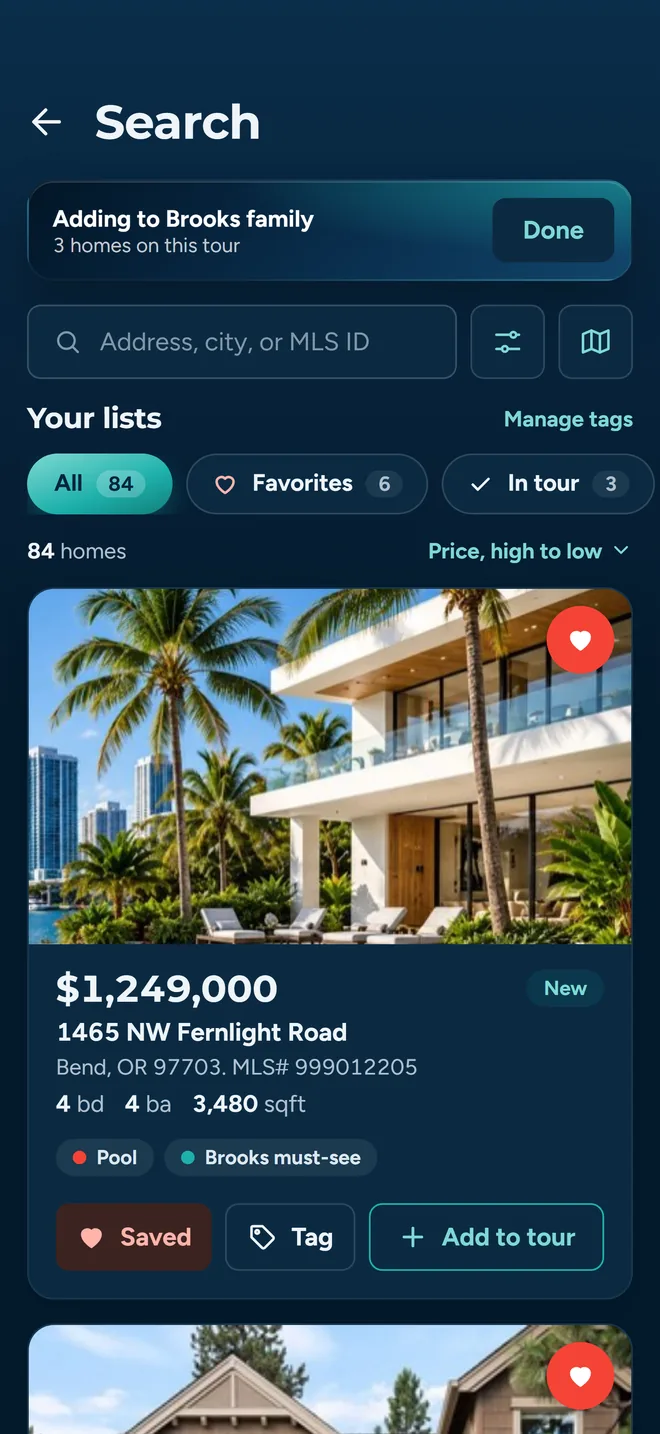
You pick where the day starts and where it ends
An optimizer that decides where your day begins is not saving you anything. The start and the end are yours to set, and the routing works around them.
Set the start
Choose any stop on the tour as the starting point. Nearest-neighbor walks out from there, so the order reflects where you actually are at the start of the block.
Set the end
With round trip off, you pick an explicit ending point and it is reserved for the last position. Useful when the day has to finish at the office, or at the buyer's parked car.
Or round-trip it
Round Trip ends the day back at your starting point. The return leg is appended with its own drive time and distance, so the total on screen includes getting home.
Drive times
Real road times, with a fallback path that degrades honestly
Straight-line distance is what makes routing apps put two houses next to each other on the map and forty minutes apart on the road. About Time Tours builds a full matrix of driving times between every pair of stops before it decides anything, and it tries three sources in order.
- 1
Google Distance Matrix
PrimaryRequested through a maps-proxy Lambda in batches of 10 origins by 10 destinations, so a nine-stop tour is one call and a twenty-stop tour is four. The key that signs that request is an environment variable on the Lambda: it is appended server-side and never comes back to the client. If a single batch fails, only that tile of the matrix falls back to a straight-line estimate. The rest of the real drive times stand.
- 2
OSRM Table
FallbackIf every Distance Matrix batch fails, the whole matrix is rebuilt from the OSRM Table API, which returns durations and distances between all stops in one request. Different provider, same shape of answer.
- 3
Haversine estimate
Last resortStraight-line distance between coordinates, converted to time at 13.4 m/s, roughly 30 mph. It is an estimate and the app labels the source internally, but it means an outage costs you accuracy rather than an itinerary.
Why the proxy matters to you
The data requests behind a tour (drive times, geocoding, directions) are made by a server function rather than by the phone in your pocket. The key that signs them lives in that function’s environment and never leaves the server. That is the difference between a key you can rotate and a key that has already been extracted from a public app binary. Drawing a map on screen is a different job with a different answer: that one is rendered on the device, so a Maps key does ship in the app for it, the way it does in every app that draws a Google map.
Ordering
How the order actually gets chosen
Two passes, both deterministic. Run it twice on the same stops and you get the same answer, which matters when you are explaining the day to a buyer.
Pass one: nearest neighbor
From the starting point, take the closest unvisited stop by driving time, then repeat. It is fast, it is easy to reason about, and it gets most of a tour right on its own.
It also has a known failure: a cheap early hop can strand a far stop for last and cost you the drive back across town. That is what pass two is for.
Pass two: 2-opt improvement
Take two edges in the route, reverse the segment between them, and keep the change only if the total driving time drops. Repeat until no swap improves anything. This is what untangles the crossed path nearest neighbor leaves behind.
Below four stops there is nothing to untangle, so the pass does not run and the order stands as ordered.
What you get back, per stop
Each stop carries its own drive time and drive distance from the previous stop, and the tour carries the totals. So the itinerary is not just an order, it is an answer to “how long is the gap between these two houses” that you can read out loud to a buyer before you commit to it.
Pinning
A confirmed showing does not move
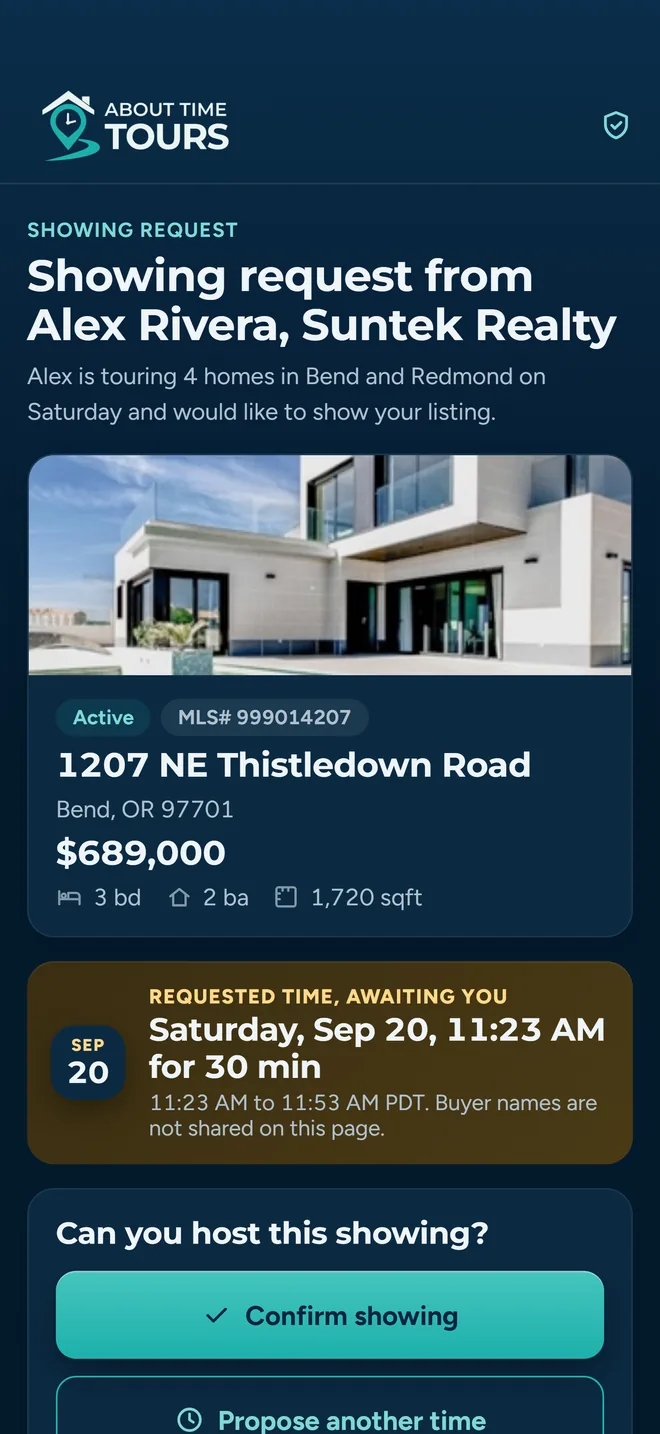
This is the part that separates a real tour tool from a route planner. Once a listing agent has confirmed a stop for a specific time, that time is a promise you made. Re-running the optimizer must not quietly break it.
The optimizer routes around them
Confirmed stops are pinned to their positions. The nearest-neighbor pass treats them as already visited so the greedy walk never selects them, then they are spliced back at exactly the index they held. The 2-opt pass refuses to reverse any segment that contains a pinned stop. Everything else is routed around the fixed points.
Moving one is a deliberate act
A confirmed stop carries an explicit Unlock control, and the app states the cost before you use it: releasing the stop allows re-routing, and if the time moves you will need to re-confirm with the listing agent. When a proposed schedule would move stops that are already confirmed or already contacted, you see how many before you apply it, not after.
Control
Your order wins, until you say otherwise
You know things the matrix does not. The seller who is only home after three. The school pickup at 2:40. The listing you want shown last because it is the one you expect them to buy.
Reordering by hand locks the order
Move a stop up or down, set a custom time, and the tour is flagged as manually ordered on the record itself. Reopen it tomorrow and your arrangement is what loads. Drive times are recalculated for the sequence you chose, but nearest neighbor and 2-opt do not run and do not reshuffle you.
Re-optimizing is one explicit button
A banner tells you the manual order is locked, with a Re-optimize control beside it. Tapping it asks first, because it replaces your order with the suggested fastest route and recomputes stop times. Nothing about that happens on its own.
Timing
The buffer between showings is a number you own
Drive time is not the whole gap between two houses. There is parking, the lockbox, the walk-in, the buyer finishing a phone call in the car. That padding is an explicit setting rather than an assumption baked into the math.
Five minutes, adjustable
The default is five minutes. Step it up or down in five-minute increments, anywhere from zero to an hour, right on the tour you are building. A per-tour setting overrides your personal default, which overrides the five-minute baseline.
One number, three engines
The same buffer feeds the times you see on screen, the times written to each stop, and the time quoted in the confirmation request the listing agent receives. They are resolved from a single source, so what you promised and what you saved cannot drift apart.
Times you type are authoritative
Every auto-computed stop is previous departure plus drive plus buffer, with a 30-minute default showing length. A time you set yourself is exact, and everything after it reflows around it.
Overrunning the day is visible
If the assembled schedule runs past the end time you set for the tour, the builder says so and tells you by how much, while you can still cut a stop instead of discovering it at 5:40 in someone’s driveway.
Same-day double bookings are flagged
When the route is built, the app checks whether any of these listings already have a showing scheduled on that date from another tour, skipping cancelled and declined ones, and surfaces the conflict before you send anything out.
Why this is the whole game
A tour that is fifteen minutes optimistic per stop is an hour late by the last house. The point of an explicit buffer is that your itinerary is defensible to the listing agents you are asking to hold a window open.
Efficiency
Nothing is recomputed for nothing
Reopening a tour to check the third address should not cost a round trip to a mapping API, and it should not cost you a spinner in a client’s driveway on a weak signal.
The stop list gets a fingerprint
Every stop contributes its identifier and its coordinates, rounded to five decimal places, into one deterministic string stored on the tour. Same stops in the same places, same fingerprint.
Match means reuse, change means recompute
When the fingerprint matches what was saved and per-leg drive times are already stored, the route is rebuilt from that saved data with no matrix calls at all. Add a stop, remove one, or move a custom pin, and the fingerprint changes, so the route is recalculated properly rather than shown stale.
A slow answer cannot overwrite a fresh one
Each optimization run is tagged. If you change the stops while one is still in flight, the older run is discarded on arrival instead of clobbering the newer result. On patchy rural signal that is the difference between a correct itinerary and a confusing one.
Multi-client tours
One tour, several buyers, separate opinions
A couple is two people, and they frequently disagree about the kitchen. Recording one verdict per house throws away the only information that tells you which of the two you still have to convince.
Several clients on one tour
Attach more than one buyer to the same tour. Each is recorded against it individually, as a snapshot taken at the time the tour was built, so later changes to a group do not rewrite history.
Feedback per client, per stop
At each stop, each buyer gets their own Interested or Not Interested and their own notes, stored against that person and that showing rather than merged into one row.
Nobody gets skipped quietly
With more than one client on the tour, name chips at each stop take the color of that person's verdict, and moving to the next stop pauses to name whoever has no verdict yet. You can skip past that when the day is moving, and fill the feedback in later from the tour details.
That detail carries forward. Per-client feedback rolls up into the client view, so the next tour you build starts from what each buyer actually said about the last one.
Straight answers
What the app does not do yet
You are going to find this out in week one either way, so here it is now.
What it costs
$20 per agent per month after a 30-day free trial; $5 per agent per month for organizations of 51 to 1,000 agents; larger by agreement. Organizations are set up with us on an agreement rather than bought through a checkout.
MLS coverage is two regions
Listing search resolves the Oregon Data Share feed, covering Central and Southern Oregon around Bend, Medford and Klamath Falls, plus South Florida through the MIAMI Association of REALTORS feed, from a cache refreshed every 15 minutes rather than a live MLS query. Check your market and MLS before getting started. Anywhere outside coverage, custom stops still route normally.
AI suggestions are a layer on top, not the engine
Everything described on this page is the deterministic router, and it runs for everyone. The Schedule Assistant also offers AI suggestions to Pro agents and to every agent an organization covers. They are a panel you read: nothing on your tour changes until you tap Apply, and you can switch them off in Settings.
Signing is a separate add-on
Buyer agreement drafting and signing lives outside tour planning, and the signature tooling may be offered as an add-on that is not separately priced yet. Ask us and we will tell you where it stands.
Where this fits with the rest
Showing confirmations
What happens to the times this page computes once they go out to nine different listing agents.
Read moreMLS search
Where the stops come from: filters, drawn areas and the add-to-tour control on every result.
Read moreClients and favorites
Getting the buyers onto the tour, and where their per-stop feedback ends up afterwards.
Read moreBring your next eight-stop afternoon
The routing described on this page is what ships in the app today. Coverage is live in Central/Southern Oregon and South Florida, and the fastest way to judge it is to rebuild a tour you already drove and compare the order.