Notifications
Every push has an off switch, and you own it
Most software assumes you want everything, forever, on every channel. Message Preferences splits what the app sends into four categories, each with its own push, email and SMS switch, keep confirmations buzzing your phone and let the rest arrive as email.
$20 per agent per month after a 30-day free trial; $5 per agent per month for organizations of 51 to 1,000 agents; larger by agreement.
- Four categories, three channels
- Each one is its own switch. There is no single mute that takes the useful alerts down with the noise.
- Your phone still outranks us
- If iOS or Android has notifications off for the app, nothing we do overrides that. The screen says so and sends you to your device settings.
- Off means off at the server
- The push switch is checked before a push is built, not after it arrives. Turn a category off and nothing is queued for it.
What the app actually messages you about
Worth knowing before you decide what to switch off. The list is short on purpose: these are the events that send something today, not everything the categories could one day cover.
- A listing agent answers a showing request
- Showing Confirmed, Showing Declined, Alternative time proposed, or scheduling notes. Sent to the agent who asked. This is the one most agents leave switched on.
- A tour is cancelled
- The clients on that tour are told, so nobody drives to a stop that no longer exists.
- A tour moves to another agent
- The clients on that tour are emailed and pushed the name of the agent taking it over.
- A saved search turns up new listings
- Turn alerts on for a saved search and it emails you once a morning when new homes match, with the count in the subject and the first few homes in the body. This is what Properties & Lists sends.
- A showing request reaches a listing agent who also uses the app
- They get it on their phone as well as by email and text.
- Feedback is recorded on a stop
- During a tour, saved feedback on a property goes to the other people on that tour.
- A buyer agreement is sent to sign
- The client gets told there is a document waiting, not just an email in a spam folder.
- A client accepts, declines, or moves agent
- Invitation outcomes go to the agent who sent them.
- Your licence check clears
- One message when your agent account is verified and the gated features open up.
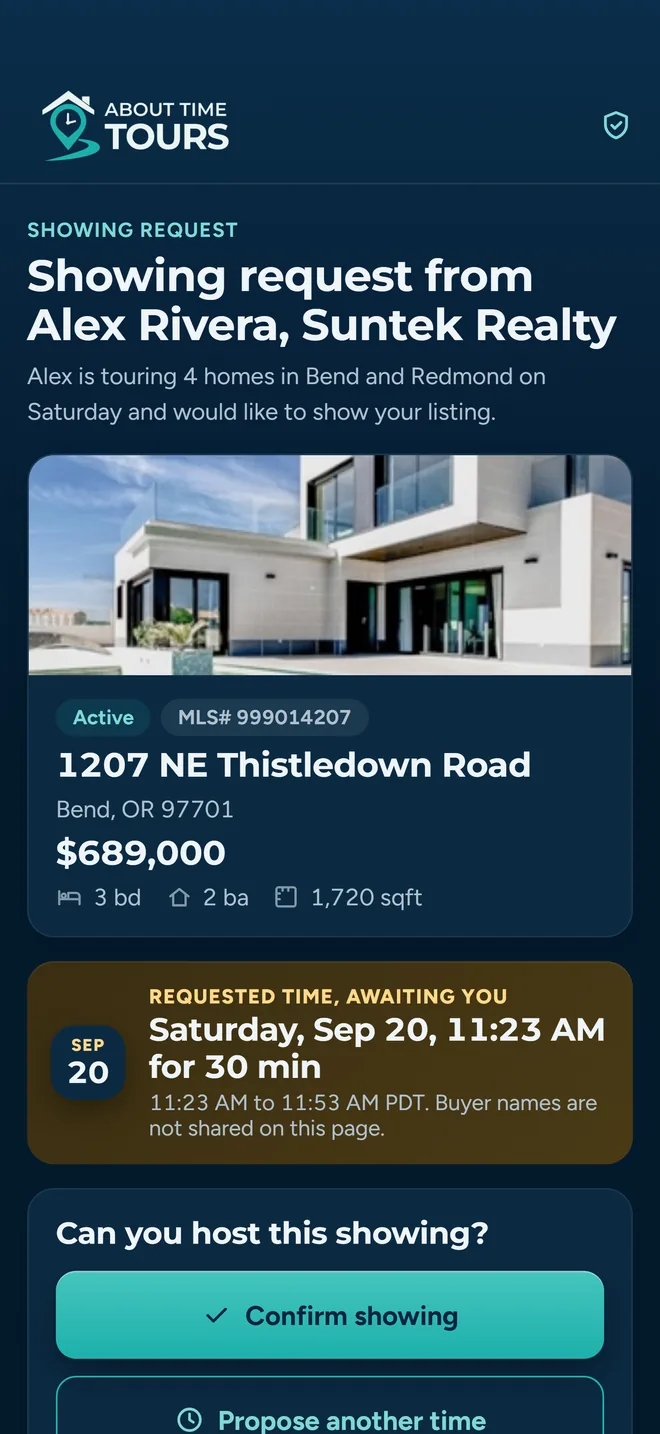
This answer is the notification agents care about most, which is why Tours & Showings ships with all three channels on.
Four categories, not one master mute
Settings → Message Preferences. Each card is a category, each row inside it is a channel, and the switch saves the moment you flip it, so muting marketing email never mutes the answer to a showing request.
Tours & Showings
Answers to your showing requests, and changes to a tour you are on. Anything that does not fit another category lands here.
Everyone
Properties & Lists
The saved-search email, for searches you switched alerts on. Favorites and shared lists sit here too, but nothing sends on those yet.
Everyone
Feedback & Communication
Feedback recorded on a property during a tour you are on.
Everyone
Updates & Marketing
Platform updates and marketing email.
Everyone
What is on before you touch anything
These are the defaults a new account starts with. Nothing here is a recommendation you have to live with. The point of publishing them is that you can see what you are turning off.
| Category | Push | SMS | |
|---|---|---|---|
| Tours & Showings | On | On | On |
| Properties & Lists | On | On | Off |
| Feedback & Communication | On | On | Off |
| Updates & Marketing | Off | On | Off |
SMS defaults on for Tours & Showings and off everywhere else. It is the one column that does not change what reaches you yet: no category texts you today, whatever the switch says.
The three channels behave differently
They are not interchangeable, and pretending otherwise is how apps end up texting people at midnight. Each one carries its own rules.
Push: iPhone and Android only
Push runs through the installed app: in a browser the push row is not there at all.
Turning push on asks your device for permission the first time. If you already refused, the app says so and offers to open your device settings rather than pretending the switch worked.
Turn push off everywhere and the app clears the push token, so there is nothing on file to send to.
Email: everywhere
The one channel with no device gate and no setup. On by default for all four categories.
One of those switches is read at send time: the Properties & Lists digest checks it every morning. The rest of what the app emails you, a cancelled tour or an agreement waiting to be signed, is sent because the event happened rather than because a preference row allowed it.
For a quiet phone and a full record: push down to Tours & Showings only, email left on.
SMS: consent on the record
An SMS switch will not move until your profile has a phone number. The app says so and asks you to add one in Profile first.
Every flip of an SMS switch writes a consent record, channel, action and origin, and an opt-in stamps the date on your account, so “when did I agree to this” is a lookup.
What it does not do yet is text you. The only texts the app sends automatically are showing requests and their answers, and those go to listing agents on the number in the listing. Your SMS switches are saved and consented for when that changes.
Master controls
Under the category cards sits one row per channel: all push, all email, all SMS. Flipping a master switch applies it to every category you can see, which is the fast way to get to a quiet phone before a weekend and back again on Monday. The same phone-number and device-permission rules apply. The master switch does not smuggle past them.
A push switch off is checked before the push is built
Plenty of apps store your preferences and then send anyway, leaving your phone to filter it. Push here is not one of them. Email is a mix: the saved-search digest reads your switch every morning, the rest is sent on the event.
The category is resolved first
The server works out the category, reads your preference for it, and builds a push only if it is on and a token exists.
Marketing needs consent on the record
An address that has not been proven, or that has no consent record behind it, is never sent marketing email. Every marketing email carries a one-click unsubscribe, and unsubscribing is what stops the ones after it. Push is the other way round, an unreadable preference counts as a yes.
Every attempt is logged
Sent or skipped, each push writes an outbound record with the reason, so “I never got it” has an answer.
Limits worth knowing before you rely on it
Four things that surprise people, listed here rather than discovered later.
- Push needs the app
- Open Message Preferences in a browser and you get email and SMS only. There is no web push, so the push column simply is not offered there.
- SMS needs a number first
- Flip an SMS switch without a phone number on your profile and the app stops you and asks you to add one in Profile, rather than failing quietly later.
- Showing requests are not a notification setting
- The request that goes to a listing agent is the work itself. Most listing agents are not users of the app, so those emails and texts are sent on the strength of the showing, not on a preference row.
- Marketing push starts off
- The only category that ships with push already off. We do not turn it on for you.
Where this fits with the rest
Showing confirmations
The event behind most of the messages: one link that lets a listing agent confirm, decline or propose another time.
Read moreTerritory activity
Draw a service area and follow listing activity inside it.
Read moreTeams
Duty status and location sharing, which is separate from anything on this page.
Read moreSet it once and stop thinking about it
Guided setup is open to agents in our supported Oregon and Southeast Florida markets. Sign in, open Message Preferences, and leave on only the things you would actually want to be interrupted for.
Already set up? Get the app on the App Store or Google Play.