Walkthrough
Invite a client, and keep the roster honest
Buyers arrive as a name in a text thread and stay there. This is the other version: one email address, an invitation, and from then on a record that knows which tours they rode, which houses they liked, and who they are touring with.
Six steps, from an empty client list to a dashboard you can actually run a week from. It also answers the question everyone asks second: what happens when the client never accepts.
Available in supported South Florida and Central/Southern Oregon markets. Check your market and MLS before getting started.
Step 1Add the client
One field is required, and it is not their name. An email address is the whole entry ticket, because everything after this is keyed to it.
- What you do
- Open your client list, tap Invite Client, type the email address. Add a phone number if you have one. It is optional, and you can leave it blank without losing anything.
- What the app does
- Checks the address against your existing clients and against every invitation you have out that is still pending. A repeat is stopped with a prompt naming the person, rather than quietly sending a second email.
You do not enter a name, because the client enters their own when they sign up. What you type here is never the thing that ends up on their record.
Inviting is gated on license verification. The automatic check looks for your license number on a listing in the Oregon feed, so agents with listings in Central and Southern Oregon usually clear at once and everyone else, including every South Florida agent today, is reviewed by a person, typically within one business day. Until it clears, the app tells you invites are on hold instead of failing silently.
Step 2What actually gets sent
An email, with a link, carrying a token minted for this one invitation. Not a code you have to read down the phone, and not a shared sign-up page.
- What you do
- Tap Invite client. The confirmation screen offers to send another one, or to go straight to your list. If you invited the wrong address, cancel that invitation from your client list and send a new one.
- What the app does
- Writes the invitation, stamps it with a seven-day expiry, and emails the client a link under the subject line carrying your name. The link resolves to you specifically, so whoever opens it is joined to your book, not to the app at large.
Seven days is enforced at the far end, not just displayed. Accept on day eight and the app refuses the link rather than half-joining someone.
The invitation goes by email
A phone number on the invitation carries into the client's profile when they accept, with automated messaging off until they confirm consent themselves. You can still call or text it by hand.
Opens are tracked, quietly
If their mail client loads images, the roster row moves from Invited to Opened. Treat the absence of an open as no information at all: plenty of mail apps block images by default, and a blocked image looks identical to an unread email.
Step 3How the client accepts
Their side is three screens, and the last one is where they hand over the details you deliberately did not type for them.
- What you do
- Nothing. You get an email and a push notification when they accept, and one when they decline, which is worth knowing early rather than on Saturday.
- What the app does
- Opens Create Your Account with their email already filled in and your name shown underneath. There is no password to create; a six-digit code sent to that address confirms it. Then they land in onboarding: first name, last name, phone, and where they are looking. The number you entered is pre-filled so they only have to confirm it.
Their record is built from what they typed, so the spelling on the buyer agreement and the itinerary is theirs, not your best guess from a listing inquiry.
Two cases worth knowing about
- They already work with an agent. Acceptance pauses until they confirm the switch, and their previous agent is notified when it goes through. Nobody's client list changes behind their back.
- They came from your agent page. A client can create an account from your agent page instead of from an invitation, and still arrive attached to you without you sending anything.
Step 4When nobody accepts
Most invitations are answered. The ones that are not should cost you a tap, not a Saturday, and they should never block you from building the tour.
- What you do
- Resend from the row when the email has gone stale, or cancel it outright. If they said no, the row says Declined and you can send again once the conversation has moved on.
- What the app does
- A resend revokes the old invitation and issues a new link with a fresh seven-day window, so there is never more than one live invite per person. Cancelling revokes the link immediately.
You can build the tour before anyone accepts. Pick the invited person as the tour's client and the tour holds their email as a placeholder, labeled Invited, and the day they accept, the app links those tours to their new account and drops the placeholder.
What each roster label means
- Invited
- The invitation is out and nothing has come back yet.
- Opened
- The invitation email registered an open. It is a signal, not proof of either direction.
- Invited, not yet registered
- You have grouped or scheduled around this person before they finished signing up, so the app is holding a placeholder record for them.
- Declined
- They turned the invitation down. You were emailed and notified when it happened.
- Active client
- Accepted, registered, and attached to you.
Step 5Group the household
Couples do not tour separately, and they should not sit in your list as two unrelated rows that happen to share a last name.
- What you do
- Select two or more people and link them. The group takes a name built from the members (John & Jane Smith, or both full names when the surnames differ), and you can rename it to anything you like.
- What the app does
- Keeps one person in one group of yours at a time. Someone already in a multi-person group has to be removed from it before they can be linked into another, so the household you are looking at is always the real one.
From the group you can pull a tour feedback report for everyone in it, or open a group text or group email prefilled with the members in your own messaging app.
Group someone before they register
An invited person who has not signed up yet can still be linked into a household. The app creates a placeholder record for them and swaps it out for the real account once they accept.
Groups anchor the paperwork
A buyer agreement belongs to the group, not to one person in it. Change who is in the household and the active agreement is voided so the group signs again cleanly, rather than being left signed by a composition that no longer exists.
Step 6Work the roster
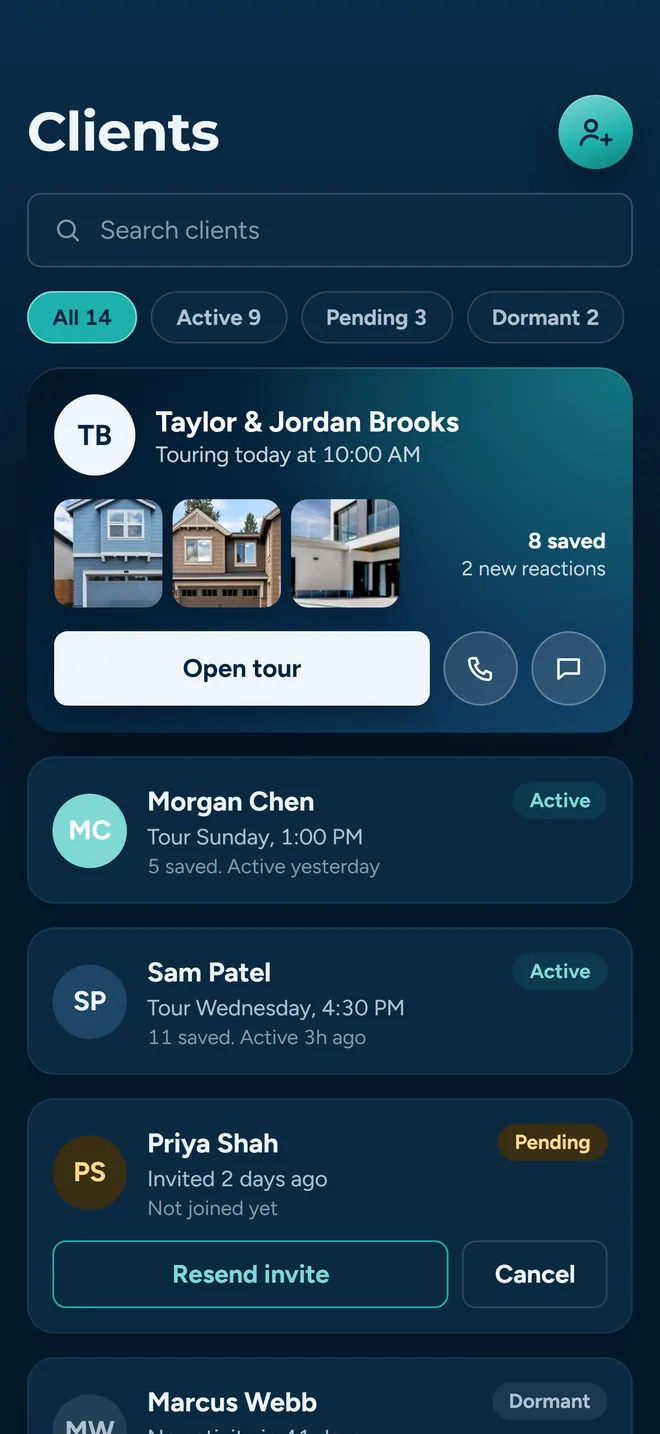
The client list is where the week is triaged. A search box, a row of filter chips, and every row carrying enough to decide what to do next without opening anything.
- What you do
- Filter by Active, Pending, Declined or Inactive (each chip carries its own count) or search across names, email addresses and phone numbers. Tap a row to call, text or email that person.
- What the app does
- Shows each client with the tour they have coming up, how many lists they are sitting on, how many tours they have been out on, and their thumbs-up and thumbs-down counts from tours you have run.
Browse as a client and you see their favorites the way they see them: useful before a call, and the fastest way to know what they have been saving at eleven at night.
One list, not a dashboard
Clients and outstanding invitations sit in the same roster, households kept together, searchable by name, email address or phone number.
Requests live on the Agent tab
Showing requests for your own listings, and clients asking you to add a property to a tour, queue up there with your tours and agreements, grouped by urgency.
The row is the summary
Open a client for what the row only hints at: their recent activity, their lists, and Browse as.
Removing a client is a real disconnection, not a hidden row: the link to you is cleared, they come out of your groups, and any active agreement for those groups is voided. The app asks first.
What the client gets out of accepting
The invitation has to be worth opening. Here is what is on the other side of it, from the buyer's point of view.
Their own account
Not a link that expires, and not a thread they have to scroll. Their tours, their properties, their feedback.
Favorites and lists
They save properties into their own lists and share a list back to you when they want your read on it.
The itinerary
Stops in visit order with times. The shared link opens without an account. Accepting also keeps every tour in their app, ready to drop into their calendar.
A verdict that is theirs
Interested or not interested, per property, recorded under their name rather than merged with their partner's.
The full picture of what accumulates on a client record is in clients and favorites.
Before you send your first invitation
What it costs
$30 per agent per month after a 30-day free trial; $5 per agent per month for organizations of 51 to 1,000 agents; larger by agreement. Start with guided setup and we will walk you through it.
Coverage is Central/Southern Oregon and South Florida
Listing search runs on two feeds: the Oregon Data Share feed, serving Central and Southern Oregon (Bend, Medford, Klamath Falls), plus South Florida through the MIAMI Association of REALTORS®. Out of area, join the waitlist.
Agents are verified first
Your license number is checked against the MLS feed during onboarding. Invitations open up once it clears, which is why the very first thing to do is finish onboarding, not build a client list.
Consent is the client's to give
A phone number you enter arrives flagged as added by you, with automated messaging off until the client confirms it on their own device. Manual calls and texts are unaffected.
One agent per client
A buyer is attached to one agent at a time. Moving to you is an explicit choice they make, with their previous agent notified, which is the behavior you want when it is your client on the other side of the switch.
Teams see it differently
If you run with a partner or an assistant, read teams before you start inviting; it changes who can see what you build here.
Where to go next
- Plan and run a tourThe nine steps from an empty tour to signed-off feedback.
- Search and shortlistGetting from MLS results to a list worth driving.
- Send showing requestsOne pass instead of nine phone calls.
- Clients and favoritesWhat builds up on a client record over a season.
- NotificationsWhat the app tells you, and when.
- For buyersThe page to send someone who asks what they are joining.
Start with the two buyers you are already touring
Invite the couple you have out this weekend, link them into one household, and build the tour before either of them accepts. That is the whole flow, and it takes about a minute.
Already have an invite? Download for iPhone or get it on Google Play.